333 ကို unregister လို႕ SMS ပို႕လိုက္ပါ။

ဖတ္ထားမွတ္ထား သည္ မ်ား ကို မွတ္စု တစ္ခု အေနျဖင္႕ ျပန္တင္ျပထားပါသည္။
Showing posts with label အိုင္တီ ဗဟုသုတ. Show all posts
Showing posts with label အိုင္တီ ဗဟုသုတ. Show all posts
Monday, September 23, 2013

Thursday, April 4, 2013
Youtube Video File ေတြကုိ MP3 ေျပာင္းပုံေလးပါ.......
Youtube က သီခ်င္းေတြကုိ MP3 ေျပာင္းဖုိ႕အတြက္ ဒီကုိ Click

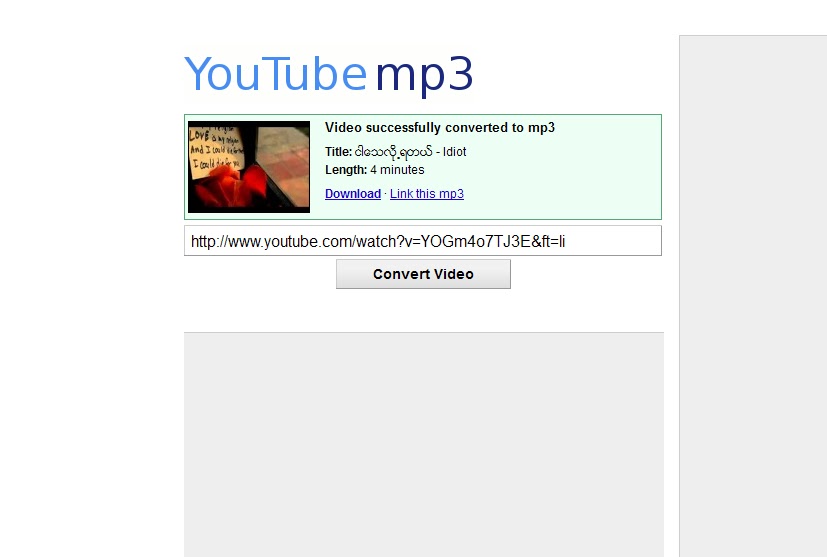
ေအာက္ကေနရာေလးမွာ Youtube က Link ထည္႕ျပီး Convert Video ကုိ Click လုပ္လုိက္တာနဲ႕ သူ႕ဟာသူ MP3 ေျပာင္းေပးမွာေနာ္ ျပီးရင္ Download လုပ္လုိက္ရုံပါပဲ..အဆင္ေျပၾကပါေစဗ်ာ .....
( YL ½ )
Tuesday, January 29, 2013
မိုဘုိင္းဖုန္းႏွင္ ဆက္စပ္ေသာ စိတ္ေရာဂါသစ္ ေတြ႔ရွိ
ရယ္စရာ မဟုတ္ပါဘူး။ တကယ္ ေရာဂါ စစ္စစ္ျဖစ္ပါတယ္။ ဟန္းဖုန္း မရွိေတာ့ တာမ်ိဳး၊ ဟန္းဖုန္း ပါဝါကုန္သြားတာမ်ိဳး၊ ဟန္းဖုန္း ေဘလ္ကုန္ သြားတာ မ်ိဳးက်ရင္ စိတ္ဓာတ္က်ဆင္းမွုနဲ႔ အျခား မအီမသာ ခံစားခ်က္ တစ္ခု ျဖစ္ေပၚျပီး ယင္းစိတ္ေရာဂါကို Nomophobia လို႔ အမည္ေပး ထားပါ တယ္။
အရွည္ေခၚကေတာ့ no-mobile-phone phobia ျဖစ္ပါတယ္။ ဖုန္း ပါဝါ ကုန္သြားလို႔ ဘက္ထရီအားမျဖည့္ရေသးတာမ်ိဳး၊ ဖုန္းေဘလ္ကုန္သြားလို႔ စိတ္ညစ္ရတာမ်ိဳးကေတာ့ ေတာ္မ်ားမ်ား ေတြ႔ၾကံဳရပါတယ္။ ေနာက္ တစ္ေနရာရာ သြားတဲ့အခါ ဖုန္းေမ့ခဲ့တာတို႔၊ ဖုန္းေပ်ာက္သြားတာ တို႔ ျဖစ္ရင္ လည္း ပိုဆုိးတဲ့ စိတ္ခံစားခ်က္ တစ္ခုကို ရပါတယ္။ ျပီးေတာ့ အသံတစ္ခုခု ၾကားတာနဲ႔ မက္ေဆ့ခ်္ဝင္တယ္၊ ဖုန္းလာ တယ္လို႔ ထင္ေနရာကလည္း ယင္း Nomophobia စိတ္ ေရာဂါ အေျခအေန တစ္ခု ျဖစ္ပါတယ္။
ဖုန္းရဲ ႔ လူ႔ဘဝ လုပ္ငန္းေဆာင္တာမွာ ပါဝင္တဲ့ အစိတ္အပိုင္းက ၾကီးမား လာျပီး စိတ္ပိုင္းဆိုင္ရာ တစ္ခုလံုးကို လြမ္းမိုးလာတာမ်ိဳးတို႔ ျဖစ္တတ္ပါ တယ္။ ဖုန္းမရွိရင္၊ဖုန္းေလးမွ မဆက္ရရင္ အထီးက်န္တယ္လို႔ ထင္ျမင္ လာတတ္ၾကျပီး ဖုန္းကိုအေျချပဳလုိ႔ ေနထုိင္မွုမ်ား ျပဳလုပ္ပါတယ္။ Nomophobia ရဲ ႔ ေနာက္ဆက္တြဲကေတာ့ အထီးက်န္တယ္လို႔ ခံစားရတဲ့ စိတ္ေရာဂါ အေျခအေန တစ္ခုသုိ႔ ေရာက္ရွိႏိုင္ေစတယ္လို႔ ေလ့လာသူတို႔က ဆိုထားပါတယ္။
--
Ref: Tech Space Journal
Monday, January 28, 2013

Saturday, January 12, 2013
Ytune ဆိုသည္မွာ
မိတ္ေဆြ၊ သူငယ္ခ်င္းမ်ားမွ သင့္ထံ ဖုန္းေခၚဆိုေသာ အခါ ပံုမွန္ ျမည္ေနေသာ Ring ျမည္သံ အစား တီးလံုးသံေလးမ်ား ၾကားလိုပါသလား? Ytune ကို အသံုးျပဳျခင္းအားျဖင့္ သာယာနာေပ်ာ္ဖြယ္ေကာင္းေသာ သံစဥ္မ်ားျဖင့္ သင့္ရဲ႕တယ္လီဖုန္းဆက္သြယ္ခ်ိန္တိုင္းမွာ စိတ္ၾကည္ႏူးမႈရယူႏိုင္ပါတယ္ .. Ytune အား ပံုမွန္လစဥ္ေၾကး ေပးသြင္းျခင္းအားျဖင့္ မိမိထံသို႕ ဖုန္းေခၚဆိုေသာ မိတ္ေဆြမ်ားကို Ring Tune သီခ်င္းသံေလးမ်ား နားဆင္ေစရင္း ရသသစ္တစ္မ်ဳိးခံစားႏိုင္ၾကမွာ ျဖစ္ပါတယ္... သင့္မိတ္ေဆြမ်ား ထံသို႕ တစ္ေန႔တာ အျပန္အလွန္ ဆက္သြယ္ခ်ိန္တိုင္းအတြက္ “သံစဥ္မ်ားသီက်ဴးေပးေနမဲ့ Yatanarpon Ytune” အား အသံုးျပဳၾကပါစို႕ ... |
|||||
- ပထမအဆင့္အေနျဖင့္ Ytune Service Website (http://www.ytune.com.mm ) သို႔ ဝင္ေရာက္ပါ။ - Ytune Service ရယူရန္ ဖုန္းတစ္လံုးခ်င္းစီအတြက္ အေကာင့္တခုစီ ေလွ်ာက္ရမည္။ အေကာင့္ေလွ်ာက္ရန္ အတြက္ Ytune Service Website ပထမဆံုးစာမ်က္ႏွာ ဝဲဘက္အထက္နားရိွ Register ဟူေသာ Link မွတဆင့္ သြားေရာက္၍ ေအာက္ပါ form အားျဖည့္စြက္ရမည္ျဖစ္သည္။  Form ျဖည့္စြက္ၿပီးေနာက္ APPLY FOR A DYNAMIC PASSWORD Button အားႏွိပ္လုိ္က္ပါက Ytune Service အတြင္းသို႔ဝင္ေရာက္ႏိုင္မည့္ Password အား သင္၏ဖုန္းသို႔ SMS Message ခ်က္ခ်င္း ေပးပို႕ အေၾကာင္းၾကားမည္ျဖစ္ပါသည္။ -ရရွိလာေသာ Password အား ေအာက္ပါ form တြင္ျဖည့္စြက္ရမည္ျဖစ္သည္။  Password ျဖည့္စြက္၍ Confirm Button အား ႏွိပ္ၿပီးလွ်င္ Register ျပဳလုပ္ျခင္း အဆင့္ ၿပီးစီးသြားၿပီ ျဖစ္ပါသည္။ |
|||||
- ပထမအဆင့္အေနျဖင့္ ဖုန္းကုဒ္နံပါတ္ 1772 သို႕ Reg ဟုေရးသား၍ Message ေပးပို႕ရပါမည္။ - အသံုးျပဳသူမ်ားထံသို႕ Service System မွ Ytune Service တြင္ အေကာင့္တစ္ခု ရရိွၿပီးျဖစ္ေၾကာင္း Auto Return Message Code 777777 အား ေပးပို႕ အေၾကာင္းၾကားမည္ ျဖစ္ပါသည္။ - System မွေပးပို႕လိုက္ေသာ Default Password Code Number သည္ Security အရ အသံုးျပဳခြင့္ ပိတ္ထားပါသျဖင့္ အသံုးျပဳသူမ်ားမွ ဖုန္းကုဒ္နံပါတ္ 1772 သို႕ [cpw +“your password” ] ဟုေရးသား၍ Message ထပ္မံ ေပးပို႕ရပါမည္။ - ထို႔ေနာက္ Ytune Service အား ဝင္ေရာက္ အသံုးျပဳေသာ သီးျခား password တစ္ခုကုိ အသံုးျပဳသူမ်ားထံသို႕ System မွ Message ေပးပုိ႕ အေၾကာင္းၾကားမည္ ျဖစ္ပါသည္။  |
|||||
-Ytune System အား အသံုးျပဳသူ Member မ်ားအတြက္ System မွ Default Ring Tune တစ္ခု သတ္မွတ္ေပးထားၿပီး ျဖစ္ပါသည္။ |
|||||
လူႀကီးမင္းတို႕ ႀကိဳက္ႏွစ္သက္ရာ သီခ်င္းမ်ားကုိ Ytune Store (သို႔မဟုတ္) Top List စာမ်က္ႏွာ ၂ ခုတြင္ စိတ္တိုင္းက် ေရြးခ်ယ္၀ယ္ယူႏိုင္ပါသည္။ ေရြးခ်ယ္ရာတြင္ Ring Tune Code (သို႕) သီခ်င္းအမ်ဳိးအစား(သို႕) သီခ်င္းသီဆိုသူ (သုိ႕) သီခ်င္းအမည္ျဖင့့္္ ရွာေဖြ၍ စမ္းသပ္နားေထာင္ ေရြးခ်ယ္ႏိုင္ရန္ လက္ရိွ ေရပန္းစားေနေသာ သီခ်င္းမ်ားႏွင့္ ေနာက္ဆံုးေပၚ သီခ်င္းအမ်ဳိးအစားေပါင္းမ်ားစြာကုိ Top List စာမ်က္ႏွာ မွတဆင့္ လ အလုိက္၊ အပတ္စဥ္ အလုိက္ ထိပ္ဆံုး စာရင္းမ်ားကုိ ရွာေဖြ ေရြးခ်ယ္ႏုိင္ပါသည္။ |
|||||
လူႀကီးမင္းတို႕ ဝယ္ယူထားေသာ သံစဥ္မ်ားအား မူပုိင္သံစဥ္ (Default Tone) တစ္ခု ထားရိွႏိုင္ျခင္း အျပင္ အပတ္စဥ္၊ လစဥ္၊ ႏွစ္စဥ္ အစရွိသျဖင့္ ျပင္ဆင္ေျပာင္းလဲႏုိင္ျခင္း၊ မိမိစိတ္ႀကိဳက္သတ္မွတ္ထားေသာ အခ်ိန္အပိုင္းအျခားတစ္ခု (Time Period Tone) ထားရွိႏိုင္ျခင္း၊ စ ေသာ လုပ္ငန္းစဥ္မ်ားကုိ My Ytune စာမ်က္ႏွာတြင္ ေဆာင္ရြက္ႏုိင္ပါသည္။ |
|||||
ဖုန္းေခၚဆိုေသာ မိတ္ေဆြမ်ား၏ နံပါတ္မ်ားအလိုက္ အုပ္စုခြဲကာ သံစဥ္မ်ားအား တလွည့္စီ နားဆင္ႏိုင္ေစရန္ ေဆာင္ရြက္ေပးမည္ျဖစ္ပါသည္။ လူႀကီးမင္းထံသို႕ ေခၚဆိုေသာ ဖုန္းနံပါတ္မ်ားထဲမွ မိမိ၏ Tune အား မၾကားေစခ်င္ေသာ ဖုန္းနံပါတ္အား Blacklist ထဲတြင္ ထည့္သြင္းႏုိင္ပါသည္။ |
|||||
Ytune Service အသံုးျပဳသူ၏ ကိုယ္ေရးဖိုင္ထဲတြင္ မိမိႏွင့္ပတ္သက္ေသာ အခ်က္အလက္မ်ားျဖစ္သည့္ လွ်ိဳ႕ဝွက္နံပါတ္ ႏွင့္ ကိုယ္ေရးအခ်က္အလက္ အစရွိသည္တုိ႔ကို ေျပာင္းလဲႏုိင္မည္ ျဖစ္ပါသည္။ အကယ္၍ မိမိ ေလွ်ာက္ထားၿပီးျဖစ္ေသာ ဖုန္းနံပါတ္ (eg, 9 xxx xxx xxx) ကို ပယ္ဖ်က္လုိပါက မိမိ ကိုယ္ေရးဖုိင္၏ Unsubscribe Menu Tab မွ တဆင့္ ဝင္ေရာက္ပယ္ဖ်က္ႏုိင္မည္ျဖစ္ပါသည္။ တစ္လအတြင္း ရပ္ဆုိင္းလိုပါက လက္ရွိ အသံုးျပဳေနေသာ လအတြက္ ေလွ်ာက္ထားေငြ ေပးသြင္းရမည္ျဖစ္ၿပီး က်န္ရွိေသာ လအတြက္ အေကာင့္ ေလွ်ာက္ထားမႈအား ပယ္ဖ်က္ေပးရန္ လုိအပ္ပါမည္။ အေကာင့္အား Suspend (ေခတၲရပ္ဆိုင္း) လုိပါက ကိုယ္ေရးဖုိင္၏ Suspend Tab မွတဆင့္ ဝင္ေရာက္ျပဳလုပ္ႏုိင္ပါသည္။ ရပ္ဆိုင္းမႈကို ပယ္ဖ်က္လိုပါက Ytune စာမ်က္ႏွာအေပၚပိုင္း ၀ဲဘက္တြင္ရွိေသာ Log In Box အတြင္းရွိ Resume ကို ႏွိပ္ျခင္းအားျဖင့္ Suspend လုပ္ျခင္းအား ပယ္ဖ်က္ႏိုင္ပါသည္။ |
|||||
1876 (Yatanarpon Call Center) 24/7 02-51 78022 (Ytune Technical Help Desk) (Office Hour -: 9 AM to 5 PM ) သို႔ ဆက္သြယ္စံုစမ္း ေမးျမန္းႏုိင္ပါသည္။ |
 …

Friday, November 30, 2012
တတ္သေလာက္ မွက္သေလာက္ နည္းပညာစာအုပ္မ်ား
Zaw Naing (MMUG) မူရင္းပို႕စ္ ပိုင္ရွင္
တတ္သေလာက္ မွက္သေလာက္နည္းပညာစာအုပ္မ်ား
- ဒီစာအုပ္ေလးကေတာ့ iphone စာအုပ္ေလးပါ။ဒီစာအုပ္ထြက္တဲ့ခ်ိ
န္က 4S ေတာင္မထြက္ေသးဘူးဆိုေတာ့ ေတာ္ေတာ္ၾကာပါၿပီးခင္ဗ်။ ဒါေပမယ့္ iphone ရဲ႕႕႔ အေၿခခံသေဘာတရားေလးေတြကို အေသးစိတ္ရွင္းၿပထားတဲ့တြက္ ခုမွ iphone စသံုးတဲ့သူေတြတြက္ အက်ိဳးတစံုတရာ ၿဖစ္မယ္ထင္လို႔ပါခင္ဗ်။http://www.mediafire.com/view/ ?nm1zaiclgkngunq - ဒါကေတာ့ Mobile ကြန္ယက္နည္းပညာတဲ့ခင္ဗ် သန္းထိုက္ (ေရႊရိပ္) ေရးသားထားတာပါခင္ဗ်။http://www.mediafire.com/view/
?v0hkqmff0ww9wq7 - ဒါကေတာ့ Android ေပၚမွလက္ေတြ႔သံုး နည္းပညာတဲ့ခင္ဗ်။ သန္းထုိက္ (ေရႊရိပ္ ) ေရးသားထားတာပါခင္ဗ်။http://www.mediafire.com/view/
?86o2vd30n9mn73p - ဖုန္းနဲ႔မဆိုင္ပါဘူး ဒါေပမယ့္ဖတ္ခ်င္သူေတြအတြက္တခါထဲ
တင္ေပးလိုက္တာပါခင္ဗ်၊facebook အသံုးၿပဳပံုစာအုပ္ေလးပါခင္ဗ်။http://www.mediafire.com/view/ ?x1q8ycqpkgs4gha - Using Androidhttp://www.mediafire.com/view/
?y89x2vbisivwsda - မိုဘုိင္းမ်ိဳးစံု Root လုပ္ၿခင္းႏွင့္ အေၿခခံလိုခ်က္မ်ား တဲ့ခင္ဗ်၊http://www.mediafire.com/view/
?y89x2vbisivwsda
ဒီထဲမွာမပါေသးတဲ့စာအုပ္မ်ားရိွတ
(ကယ္တင္ရွင္မဟုတ္ရင္ေတာင္ ကူညီသူေတာ့ၿဖစ္ခ်င္တယ္။ )
Thursday, November 29, 2012
Monday, November 26, 2012
Question and and answer about mobile
Precautions when using mobiles
- Do not place the phone in damp places so as to protect the device from moisture;
- Do not place the phone together with hard objects so as to prevent the device from getting scratched;
- Do not disassemble the phone by yourself, if the phone does not work correctly, go to authorized service center in your local area;
- Do not use accessories such as batteries, chargers, data cables and earphones made by unauthorized manufacturers;
- Do not charge the phone for too long time. It should not be over 24 hours;
- Keep the phone away from strong magnetic field.
What are the factors that affect the standby time of my phone?
The standby time of your phone depends on many factors. It is directly affected by the signal strength of your local network, call duration, time used as well as the number of messages sent and received. It is also determined by the battery capacity and hardware configurations (such as the size and material of LCD).
The standby time of your phone depends on many factors. It is directly affected by the signal strength of your local network, call duration, time used as well as the number of messages sent and received. It is also determined by the battery capacity and hardware configurations (such as the size and material of LCD).
What should I do if the phone can not be powered on?
- Check and see if there is residual power in the battery or if the battery can be charged normally.
- Check and see if the phone can be powered on normally after changing the battery.
- Please send the phone to designated service center for detection if the problem is caused by the phone.
Why is "Invalid SIM" shown on my phone?
SIM card is a small card used in the phone to access the mobile network. In almost all cases, you are advised to resort to your operators or service suppliers with regard to SIM card problems.
Your phone will display SIM card error messages in any of the following conditions:
SIM card is a small card used in the phone to access the mobile network. In almost all cases, you are advised to resort to your operators or service suppliers with regard to SIM card problems.
Your phone will display SIM card error messages in any of the following conditions:
- SIM card not aligned. You may need to calibrate the SIM card if you have dropped, knocked or unfolded the phone. Install the SIM card by following the instructions supplied.
- Your SIM card would be disabled once a wrong PUK (PIN Unblocking Key) is entered for many times. If the SIM card was disabled permanently, please contact your operator or service supplier to get a new SIM card.
- You have changed a service supplier. This may because your SIM card or your phone was configurated specifically for the previous operator, in this case, you need to re-configure the settings. Please contact your operator or service supplier for help.
If you keep receiving error messages while you are not in the above
mentioned conditions, your SIM card might have been damaged. Please
contact your operator or service supplier to test and/or change your SIM
card.
What should I do if the signal is unstable, the sound quality is poor or sound is frequently interrupted when making a call.
- Check if it is caused by weak network signal or shield.
- If the phone is found problematic, send it to the service center once.
What is Bluetooth?
Bluetooth is a radio technology which supports short-range communications (within 10m).It enables wireless data exchange between devices such as mobile phone, PDA, wireless earphone, laptop and other peripherals. Bluetooth just simplifies the communication between mobile communication terminals, also it simplifies the communication between devices and Internet successfully. All these make data transfer more speedy and effective, and paves the way for wireless communication.
Bluetooth is a radio technology which supports short-range communications (within 10m).It enables wireless data exchange between devices such as mobile phone, PDA, wireless earphone, laptop and other peripherals. Bluetooth just simplifies the communication between mobile communication terminals, also it simplifies the communication between devices and Internet successfully. All these make data transfer more speedy and effective, and paves the way for wireless communication.
What is GPRS?
GPRS is short for General Packet Radio Service. It is a new data bearer service developed based on the existing GSM system to provide packet data service for GSM users. By upgrading software and adding necessary modules, it realizes packet data transfer with existing GSM radio data.GSM bears GPRS service without the need to abort other services, for example, voice calls. GPRS is a network extension on radio applications. GPRS supports virtual link which improves the utilization of radio resources. Network applications such as FTP, WEB browser, E-MAIL and TELNET can all be used on GPRS platform.
GPRS is short for General Packet Radio Service. It is a new data bearer service developed based on the existing GSM system to provide packet data service for GSM users. By upgrading software and adding necessary modules, it realizes packet data transfer with existing GSM radio data.GSM bears GPRS service without the need to abort other services, for example, voice calls. GPRS is a network extension on radio applications. GPRS supports virtual link which improves the utilization of radio resources. Network applications such as FTP, WEB browser, E-MAIL and TELNET can all be used on GPRS platform.
- The most commonly used password is PIN, you may set your own PIN, activate or deactivate the PIN by following the relevant instructions in the User Manual.
- PIN2 is the 2nd tier PIN for some features on your phone. It works in the same way as PIN does.
- If a wrong PIN is entered for many times, you might be requested to input the PUK code (Personal Unlocking Key). The PUK is an 8-digit pass code provided by your operator or service provider.
- If a wrong PIN2 is entered for many times, you might be requested to input the PUK2.
Some MP4 videos downloaded from the Internet cannot be played on my phone, why?
Some videos cannot be played because their resolution are not supported by your phone, you will first need to convert these videos. When converting the video, just set to the resolutions that are supported by your phone. For the resolution of your phone, please refer to the User Manual.
Some videos cannot be played because their resolution are not supported by your phone, you will first need to convert these videos. When converting the video, just set to the resolutions that are supported by your phone. For the resolution of your phone, please refer to the User Manual.
How to view the IMEI no. of my phone?
In standby screen, input *#06# to show the number. You may also remove the battery, the IMEI no. is indicated on the battery cover or in the battery compartment, or find the IMEI no. on the packaging box.
In standby screen, input *#06# to show the number. You may also remove the battery, the IMEI no. is indicated on the battery cover or in the battery compartment, or find the IMEI no. on the packaging box.
How long should I charge the battery for the first time?
Please read the User Manual supplied with your phone for instructions on battery charging. If the charging time is not indicated in the User Manual: the first charge should be between 12-14 hours, but should not be longer than 24 hours. It does not make any difference when charging with the phone or the charging standard. When the battery is not used for a long time, charge the battery for a little longer (4-5 hours) so as to activate the Lithium-ion within the battery. You may remove the battery when the phone or the charger indicates that charging is complete.
Please read the User Manual supplied with your phone for instructions on battery charging. If the charging time is not indicated in the User Manual: the first charge should be between 12-14 hours, but should not be longer than 24 hours. It does not make any difference when charging with the phone or the charging standard. When the battery is not used for a long time, charge the battery for a little longer (4-5 hours) so as to activate the Lithium-ion within the battery. You may remove the battery when the phone or the charger indicates that charging is complete.
- On your PC, format the memory card in FAT; Then insert the T-Flash card into the phone, when the phone prompts that the memory card is not formatted, select Format.
- Check to see if the metal contacts of the memory card slot is clean.
- Try other T-Flash cards to determine if the memory card or the phone is problematic.
- If the phone is found to be problematic, take it to your local service center.
What conditions are required for a phone to use WAP?
- The WAP function is provided by the phone
- Apply and subscribe WAP service to your mobile operator.
- Set the WAP parameters correctly on your phone.
- Access to the Internet using a WAP browser.
What is the operating temperature of my phone?
The operating temperature of the phone is:-10℃--50℃
The operating temperature of the phone is:-10℃--50℃
What is WAP?
WAP, the abbreviation of Wireless Application Protocol, bridges the gap between the wireless communication network and Internet. The standard integrates the various new technologies in fields like computer, network and telecommunication, it enables the telecom operators, Internet service providers and other online service providers to offer unprecedented interactive services to the mass mobile users. With this communication protocol, the wireless communication users can access whatever websites at anytime, anywhere.
WAP, the abbreviation of Wireless Application Protocol, bridges the gap between the wireless communication network and Internet. The standard integrates the various new technologies in fields like computer, network and telecommunication, it enables the telecom operators, Internet service providers and other online service providers to offer unprecedented interactive services to the mass mobile users. With this communication protocol, the wireless communication users can access whatever websites at anytime, anywhere.
First turn on the Bluetooth on both devices on which you want to transfer files, and set the phones to "Discoverable". Now, search on one device for another, and pair the target phone you found. You may need to set up a pair pass code, which can be a random 4-digit pass code. When two devices are paired successfully, files can be transferred from one device to another.
Friday, October 19, 2012
android knowledge
iPh msg center **5005*7672*+9595930003# and call (for 5 lakhs and 15 lakhs)
**5005*7672*+9595930014# and call (for 2 lakhs and 2.5 lakhs) ပါဝါပိတ္ဖြင့္ တခါ လုပ္ေပးရန္လိုပါတယ္
GSM internet for ios ( setting-general-network-cellular data network-apn ေတြမွာ mptnet လို.ရုိက္ထဲ့လုိက္ရံုပဲ)
for wireless tethering
ပါဝါပိတ္ဖြင့္တခါလုပ္ ပီး data on ၾကည့္လုိက္ပါ ခဏေစာင့္လိုက္ရင္ setting ထဲမွာ personal hotspot ပါ ရပါလိမ့္မယ္ ios 5 နဲ. အထက္ပါ
တကယ္လို. အဆင္မေျပရင္ cydia ထဲမွ pdanet ျဖစ္ျဖစ္ tetherme ျဖစ္ျဖစ္ တခုခု ေဒါင္းပီး သံုးပါ
GSM internet for android
setting-more(wireless and network)-mobile network-access point name-new apn
မွာ name-mpt
apn-mptnet
authentication type-PAP or CHAP
apn type-default (တခ်ိဳ. twz ဟန္းဆက္ေတြမွာလိုပါတယ္)
CDMA 800 internet
make new apn
name-mpt
apn-#777 (c8812 မွာ wap)
username-mpt@c800.mm
psw-12345
authentication type-PAP or CHAP
apn type-default(တခ်ိဳ.ဖုန္း ေတြမွာ ပဲလိုတာပါ)
prompt psw-#777
တစ္ခါတစ္ေလမွာ ဖုန္းရဲ႕ recovery mode ထဲကို ၀င္ဖို႔ၾကံဳတက္ပါတယ္။ ဖုန္းကပြင္႔ေသးတယ္ဆိုရင္ေတာ႔တစ္မ်ိဳးေပါ႔
pattern lock ေမ႔လို႔ပဲျဖစ္ျဖစ္ password ေမ႔သြားလို႔ပဲျဖစ္ျဖစ္ အဲဒီအခါမ်ိဳးက်ရင္ အသံုးတဲ႔မယ္ထင္ပါတယ္။
မိတ္ေဆြတို႔ေတြအေနနဲ႔လည္း ကူညီျပီးေအာက္ကေနဆက္ေရးေပးသြားပါလို႔ အကူအညီေတာင္းပါတယ္။
Connect the device and computer with USB cable. On the computer install the ADB then type into a command prompt "adb reboot recovery"
Credit to KO Yan Naung Win and Ko Pyie Sone, Zarni Tun , Nyanlin Htetnaing , Soe Min Htut , Myo Thant Zin, Han Phyo Zaw (MMUC)
**5005*7672*+9595930014# and call (for 2 lakhs and 2.5 lakhs) ပါဝါပိတ္ဖြင့္ တခါ လုပ္ေပးရန္လိုပါတယ္
GSM internet for ios ( setting-general-network-cellular data network-apn ေတြမွာ mptnet လို.ရုိက္ထဲ့လုိက္ရံုပဲ)
for wireless tethering
ပါဝါပိတ္ဖြင့္တခါလုပ္ ပီး data on ၾကည့္လုိက္ပါ ခဏေစာင့္လိုက္ရင္ setting ထဲမွာ personal hotspot ပါ ရပါလိမ့္မယ္ ios 5 နဲ. အထက္ပါ
တကယ္လို. အဆင္မေျပရင္ cydia ထဲမွ pdanet ျဖစ္ျဖစ္ tetherme ျဖစ္ျဖစ္ တခုခု ေဒါင္းပီး သံုးပါ
GSM internet for android
setting-more(wireless and network)-mobile network-access point name-new apn
မွာ name-mpt
apn-mptnet
authentication type-PAP or CHAP
apn type-default (တခ်ိဳ. twz ဟန္းဆက္ေတြမွာလိုပါတယ္)
CDMA 800 internet
make new apn
name-mpt
apn-#777 (c8812 မွာ wap)
username-mpt@c800.mm
psw-12345
authentication type-PAP or CHAP
apn type-default(တခ်ိဳ.ဖုန္း ေတြမွာ ပဲလိုတာပါ)
prompt psw-#777
တစ္ခါတစ္ေလမွာ ဖုန္းရဲ႕ recovery mode ထဲကို ၀င္ဖို႔ၾကံဳတက္ပါတယ္။ ဖုန္းကပြင္႔ေသးတယ္ဆိုရင္ေတာ႔တစ္မ်ိဳးေပါ႔
pattern lock ေမ႔လို႔ပဲျဖစ္ျဖစ္ password ေမ႔သြားလို႔ပဲျဖစ္ျဖစ္ အဲဒီအခါမ်ိဳးက်ရင္ အသံုးတဲ႔မယ္ထင္ပါတယ္။
မိတ္ေဆြတို႔ေတြအေနနဲ႔လည္း ကူညီျပီးေအာက္ကေနဆက္ေရးေပးသြားပါလို႔ အကူအညီေတာင္းပါတယ္။
Connect the device and computer with USB cable. On the computer install the ADB then type into a command prompt "adb reboot recovery"
- Huawei C8500 volume up+green+power
- Huawei C8500s
- Huawei C8600 volume up+call+power
- Huawei C8650 & C8800 & C8810 volume up+power
- samsung galaxy mini i5570 menu+power
- samsung galaxy mini schi559 volume down+left+power
- samsung galaxy 5 I5500/I5503 volume up+volume down+home+power
- samsung galaxy y GT S5360 Home Button, Volume Up button and Power
- samsung galaxy fit S5670 MENU + POWER or HOME + Power
- samsung galaxy GIO GT-S5660 Home + power and then release power
- samsung galaxy ace GT-S5830
- samsung galaxy ace plus
- samsung galaxy S Volume up + Home + Power
- samsung galaxy SII Volume up + Home + Power
- samsung galaxy SIII Volume up+ Home + Power
- samsung galaxy Nexus Volume up+Volume down + Power
- samsung galaxy Note Volume up + Home + Power
- samsung galaxy S plus
- samsung galaxy SL 4G
- samsung galaxy W
- HTC Explorer
- HTC sensation 4G
- HTC sensation
- HTC sensation XE power + vol down
- HTC sensation XL power + vol down
- HTC Desire HD power + vol down
- HTC Desire
- HTC Desire S Volume Down+ Power
- HTC wilfire S vol down + power
- HTC cha cha
- Sony Xperia Ray
- Sony Ericsson X-8
- Sony Ericsson X-10
- Huawei U8860,U8661,U8818,C8812 Volume up+ power
Credit to KO Yan Naung Win and Ko Pyie Sone, Zarni Tun , Nyanlin Htetnaing , Soe Min Htut , Myo Thant Zin, Han Phyo Zaw (MMUC)
iPh msg center **5005*7672*+9595930003# and call (for 5 lakhs and 15 lakhs)
**5005*7672*+9595930014# and call (for 2 lakhs and 2.5 lakhs) ပါဝါပိတ္ဖြင့္ တခါ လုပ္ေပးရန္လိုပါတယ္
GSM internet for ios ( setting-general-network-cellular data network-apn ေတြမွာ mptnet လို.ရုိက္ထဲ့လုိက္ရံုပဲ)
for wireless tethering
ပါဝါပိတ္ဖြင့္တခါလုပ္ ပီး data on ၾကည့္လုိက္ပါ ခဏေစာင့္လိုက္ရင္ setting ထဲမွာ personal hotspot ပါ ရပါလိမ့္မယ္ ios 5 နဲ. အထက္ပါ
တကယ္လို. အဆင္မေျပရင္ cydia ထဲမွ pdanet ျဖစ္ျဖစ္ tetherme ျဖစ္ျဖစ္ တခုခု ေဒါင္းပီး သံုးပါ
GSM internet for android
setting-more(wireless and network)-mobile network-access point name-new apn
မွာ name-mpt
apn-mptnet
authentication type-PAP or CHAP
apn type-default (တခ်ိဳ. twz ဟန္းဆက္ေတြမွာလိုပါတယ္)
CDMA 800 internet
make new apn
name-mpt
apn-#777 (c8812 မွာ wap)
username-mpt@c800.mm
psw-12345
authentication type-PAP or CHAP
apn type-default(တခ်ိဳ.ဖုန္း ေတြမွာ ပဲလိုတာပါ)
prompt psw-#777
တစ္ခါတစ္ေလမွာ ဖုန္းရဲ႕ recovery mode ထဲကို ၀င္ဖို႔ၾကံဳတက္ပါတယ္။ ဖုန္းကပြင္႔ေသးတယ္ဆိုရင္ေတာ႔တစ္မ်ိဳးေပါ႔
pattern lock ေမ႔လို႔ပဲျဖစ္ျဖစ္ password ေမ႔သြားလို႔ပဲျဖစ္ျဖစ္ အဲဒီအခါမ်ိဳးက်ရင္ အသံုးတဲ႔မယ္ထင္ပါတယ္။
မိတ္ေဆြတို႔ေတြအေနနဲ႔လည္း ကူညီျပီးေအာက္ကေနဆက္ေရးေပးသြားပါလို႔ အကူအညီေတာင္းပါတယ္။
Connect the device and computer with USB cable. On the computer install the ADB then type into a command prompt "adb reboot recovery"
Credit to KO Yan Naung Win and Ko Pyie Sone, Zarni Tun , Nyanlin Htetnaing , Soe Min Htut , Myo Thant Zin, Han Phyo Zaw (MMUC)
**5005*7672*+9595930014# and call (for 2 lakhs and 2.5 lakhs) ပါဝါပိတ္ဖြင့္ တခါ လုပ္ေပးရန္လိုပါတယ္
GSM internet for ios ( setting-general-network-cellular data network-apn ေတြမွာ mptnet လို.ရုိက္ထဲ့လုိက္ရံုပဲ)
for wireless tethering
ပါဝါပိတ္ဖြင့္တခါလုပ္ ပီး data on ၾကည့္လုိက္ပါ ခဏေစာင့္လိုက္ရင္ setting ထဲမွာ personal hotspot ပါ ရပါလိမ့္မယ္ ios 5 နဲ. အထက္ပါ
တကယ္လို. အဆင္မေျပရင္ cydia ထဲမွ pdanet ျဖစ္ျဖစ္ tetherme ျဖစ္ျဖစ္ တခုခု ေဒါင္းပီး သံုးပါ
GSM internet for android
setting-more(wireless and network)-mobile network-access point name-new apn
မွာ name-mpt
apn-mptnet
authentication type-PAP or CHAP
apn type-default (တခ်ိဳ. twz ဟန္းဆက္ေတြမွာလိုပါတယ္)
CDMA 800 internet
make new apn
name-mpt
apn-#777 (c8812 မွာ wap)
username-mpt@c800.mm
psw-12345
authentication type-PAP or CHAP
apn type-default(တခ်ိဳ.ဖုန္း ေတြမွာ ပဲလိုတာပါ)
prompt psw-#777
တစ္ခါတစ္ေလမွာ ဖုန္းရဲ႕ recovery mode ထဲကို ၀င္ဖို႔ၾကံဳတက္ပါတယ္။ ဖုန္းကပြင္႔ေသးတယ္ဆိုရင္ေတာ႔တစ္မ်ိဳးေပါ႔
pattern lock ေမ႔လို႔ပဲျဖစ္ျဖစ္ password ေမ႔သြားလို႔ပဲျဖစ္ျဖစ္ အဲဒီအခါမ်ိဳးက်ရင္ အသံုးတဲ႔မယ္ထင္ပါတယ္။
မိတ္ေဆြတို႔ေတြအေနနဲ႔လည္း ကူညီျပီးေအာက္ကေနဆက္ေရးေပးသြားပါလို႔ အကူအညီေတာင္းပါတယ္။
Connect the device and computer with USB cable. On the computer install the ADB then type into a command prompt "adb reboot recovery"
- Huawei C8500 volume up+green+power
- Huawei C8500s
- Huawei C8600 volume up+call+power
- Huawei C8650 & C8800 & C8810 volume up+power
- samsung galaxy mini i5570 menu+power
- samsung galaxy mini schi559 volume down+left+power
- samsung galaxy 5 I5500/I5503 volume up+volume down+home+power
- samsung galaxy y GT S5360 Home Button, Volume Up button and Power
- samsung galaxy fit S5670 MENU + POWER or HOME + Power
- samsung galaxy GIO GT-S5660 Home + power and then release power
- samsung galaxy ace GT-S5830
- samsung galaxy ace plus
- samsung galaxy S Volume up + Home + Power
- samsung galaxy SII Volume up + Home + Power
- samsung galaxy SIII Volume up+ Home + Power
- samsung galaxy Nexus Volume up+Volume down + Power
- samsung galaxy Note Volume up + Home + Power
- samsung galaxy S plus
- samsung galaxy SL 4G
- samsung galaxy W
- HTC Explorer
- HTC sensation 4G
- HTC sensation
- HTC sensation XE power + vol down
- HTC sensation XL power + vol down
- HTC Desire HD power + vol down
- HTC Desire
- HTC Desire S Volume Down+ Power
- HTC wilfire S vol down + power
- HTC cha cha
- Sony Xperia Ray
- Sony Ericsson X-8
- Sony Ericsson X-10
- Huawei U8860,U8661,U8818,C8812 Volume up+ power
Credit to KO Yan Naung Win and Ko Pyie Sone, Zarni Tun , Nyanlin Htetnaing , Soe Min Htut , Myo Thant Zin, Han Phyo Zaw (MMUC)
Tuesday, September 18, 2012
iPhone 5 VS Samsung Galaxy S III VS Nokia Lumia 920
| iPhone 5 | Samsung Galaxy S III | Nokia Lumia 920 | |
|---|---|---|---|
| Pricing | $199, $299, $399 (16, 32 and 64GB options) | Varies by region | TBA |
| Known Dimensions | 4.87 x 2.31 x 0.3 inches (123.8 x 58.6 x 7.6mm) | 5.39 x 2.80 x 0.34 inches (137 x 71 x 8.6mm) | 5.12 x 2.79 x 0.42 inches (130.3 x 70.8 x 10.7mm) |
| Weight | 3.95 oz. (112g) | 4.70 oz. (133g) | 6.53 oz. (185g) |
| Screen size | 4.0 inches | 4.8 inches | 4.5 inches |
| Screen resolution | 1,136 x 640 pixels (326ppi) | 1,280 x 720 pixels (306ppi) | 1,280 x 768 pixels (331ppi) |
| Screen type | IPS Retina Display | Super AMOLED HD | PureMotion HD+ IPS LCD |
| Battery | Size unspecified; up to 8 hours talk time (LTE), 10 hours (WiFi). Non-removable | 2,100mAh (user removable) | 2,000mAh (non-removable) |
| Internal storage | 16 / 32 / 64GB | 16 / 32 / 64GB | 32GB |
| External storage | None | MicroSDXC | None |
| Rear camera | 8MP, LED flash, f/2.4 | 8MP, AF, LED flash, f/2.6 | 8.7MP, AF, LED flash, f/2.0 |
| Front-facing cam | 1.2MP; 720p video capture | 2MP | 1.3MP |
| Video capture | 1080p | 1080p | 1080p |
| NFC | No | Yes | Yes |
| Radios | GSM / EDGE / GPRS: 850 / 900 / 1800 / 1900CDMA: 800 / 1900
UMTS / HSPA+ / DC-HSPA+ : 850 / 900 / 1900 / 2100 LTE: Bands 1 / 2 / 3 / 4 / 5 / 13 / 17 / 25 (not all models carry all bands) |
GSM 850 / 900 / 1800 / 1900; HSDPA 850 / 900 / 1900 / 2100; LTE (in some variants) | GSM 850 / 900 / 1800 / 1900; HSDPA 850 / 900 / 1900 / 2100; LTE 800 / 1800 / 2600 / 900 / 2100 |
| Bluetooth | v4.0 | v4.0 | v3.1 |
| SoC | Apple A6 | Exynos 4412 | Qualcomm Snapdragon S4 MSM 8960 |
| CPU | Unspecified; “2x faster than iPhone 4S” | 1.4GHz, quad-core | 1.5GHz, dual-core |
| GPU | Unspecified | Mali-400MP | Adreno 225 |
| RAM | Unspecified | 1GB; 2GB in some variants | 1GB |
| MHL | No | Yes (special adapter required) | Yes/No |
| WiFi | 802.11 a/b/g/n, dual-band | 802.11 a/b/g/n, dual band | 802.11 a/b/g/n |
| Operating system | iOS 6 | Android 4.0.4 (TouchWiz UI), upgradeable to 4.1 | Windows Phone 8 |
ကြန္ပ်ဳတာ အင္တာနက္နင့္ ပက္သက္ေသာ Links မ်ား
ကြန္ပ်ဳတာ အင္တာနက္နင့္ ပက္သက္ျပီးေတာ့
» www.Myanmartalk.net ျပည္တြင္းျဖစ္အီးေမး၊ chart phone ေတြကို
ဝန္ေဆာင္မႈေပးမယ့္ဆိုက္
» www.nyinaymin.net WIN RAR မ႐ွိသူမ်ားအတြက္
» www.etelegram.net.mm ျမန္မာ့ဆက္သြယ္ေရးမွလြင့္တင္ထားေသာ online မွ
ေၾကးနန္းပို႔ႏိုင္ေသာဝက္ဆိုက္
» www.Myanmar-pac.org ျမန္မာအင္တာနက္ကေဖးဆိုင္မ်ားအတြက္ဝက္ဆိုက္
» www.ezy.haiovs.org 100 Mb file မ်ားကို upload တင္၍ share လုပ္ႏိုင္
ေသာျပည္တြင္းဝက္ဆိုက္
» www.waitzar.com ျမန္မာဝက္ဘ္ဆိုက္လင့္မ်ားကိုၾကည့္႐ူ႕ႏိုင္
» www. freeonlinesarveys.com ျမန္မာတို႔ရဲ႕တစ္ကိုယ္ရည္စာမ်က္ႏွာစာရင္းမ်ားေဖာ္ျပ
ထားဝက္ဆိုက္ကေလးပါ
» www. ႀကိဳက္တဲ့ဆူဒိုခုဥာဏ္စမ္းကိုအေျဖထုတ္ေပးႏိုင္တဲ့
ေဆာ့ဝဲအခမဲ့ရပါတယ္။
» www. nativemyanmar.net က႑စံုပါတဲ့ျမန္မာဝက္ဆိုက္ကေလးပါ
» www. Myanmar-pac.org ျမန္မာအင္တာနက္ကေဖးဆိုင္မ်ားအတြက္ဝက္ဆိုက္
» www.myanmarengineering.org ျမန္မာကြန္ပ်ဴတာပညာ႐ွင္မ်ားမွဖြဲ႕စည္းထားၿပီး IT.ပညာရပ္မ်ားသင္ၾကားေပးေသာဆိုက္
» www.MCPA-myanmar.org ျမန္မာႏိုင္ငံကြန္ပ်ဴတာပညာ႐ွင္မ်ားအသင္း၏
ဝက္ဆိုက္
» www.Networksolution.Net သင္လိုခ်င္တဲ့ဝက္ဆိုက္လိပ္စာအသစ္ဟာ
႐ွိၿပီးသားလား၊မ႐ွိေသးဘူးလား႐ွာၾကည့္ႏိုင္တဲ့ဆိုက္
» www.fixingmycomputer.com ကြန္ပ်ဴတာျပဳျပင္ေရးလမ္းညႊန္ဆိုက္
» www.majorgeeks.com ကြန္ပ်ဴတာဆားဗစ္recovery /back-upေဆာ့ဖ္ဝဲမ်ား
ဝက္ဆုိက္
» www.problemclean.ning.com
» www.myanmaritpro.com ျပည္တြင္း ITနည္းပညာဝက္ဆိုက္
» www.Tutorialized.com ေလ့လာဖို႔ Tutorial ေဆာ့ဝဲမ်ားအစံု႐ွိတဲ့ဆိုက္
» www.webdesign.org ဝက္ဆိုက္ဒီဇိုင္းေတြေလ့လာဖို႔သင္ခန္းစာေတြ
နမူနာေတြအစံု႐ွိ
» www.w3schools.com ဝက္ဆိုက္ဒီဇိုင္းေတြေလ့လာဖို႔သင္ခန္းစာေတြ
နမူနာေတြအစံု႐ွိ
» www.sixrevisions.com web pageလုပ္ခ်င္သူမ်ားနမူနာလမ္းညႊန္နဲ႔ဒီဇိုင္းေတြ
ရယူဖို႔ဆိုက္
» www.newevolutiondesigns.com web pageလုပ္ခ်င္သူမ်ားလမ္းညႊန္ဆိုက္
» www.getnetwise.com အင္တာနက္ကိုလံုၿခဳံစြာသံုးႏိုင္ေရးအတြက္လမ္းညႊန္
ေပးတဲ့ဝက္ဆိုက္
» www.w3schools.com HTML,NET,XML,Flash စတဲ့သင္ခန္းစာေတြအခမဲ့
သင္ယူ၊ေျဖဆိုႏိုင္တဲ့ဝက္ဆိုက္
» www.computerhope.com ကြန္ပ်ဴတာဆိုင္ရာsoftware/hardwareျပႆနာမ်ား
ေျဖ႐ွင္းနည္းမ်ိဳးစံုေရးထားေသာဝက္ဆိုက္
» www. tizag.com websiteေရးသားဖို႔အတြက္ေလ့လာခ်င္သူေတြ
အသံုးတည့္မယ့္ ဝက္ဆိုက္
» www.webteacher.org ဝက္ဆိုက္အေျခခံဗဟုသုတေတြ၊ကိုယ္ပိုင္ဝက္ဆိုက္
စာမ်က္ႏွာတစ္ခုျပဳလုပ္ပံု စတာေတြ႐ွင္းျပထားတဲ့
ဝက္ဆိုက္
» www.world-cat.org ကမၻာတစ္ဝန္းကစာၾကည့္တိုက္ေတြကိုကြန္ရက္
ခ်ိတ္ဆက္ေပးေနတဲ့ဆိုက္
» www.elo-godesign.com လိုဂိုအေကာင္းဆံုးလင့္ခ္ ၃၀၀ ေက်ာ္ကိုစုစည္း
ေပးထားတဲ့ဝက္ဆိုက္ portableapps.com ေပါ့ပါး
ေသးငယ္အသံုးႂကြယ္တဲ့ေဆာ့ဝဲေလးေတြကိုစုစည္း
ထားတဲ့ဆိုက္
» www.pic-nik.com သင့္႐ုပ္ပံုတစ္ပံုကိုအင္တာနက္ေပၚမွာတည္းျဖတ္
ႏိုင္မယ့္ဝက္ဆုိက္
» www.betterworldlinks.org websiteသံုးေသာင္းေက်ာ္အျဖစ္အပ်က္ေတြကို
ေ႐ြးထုတ္ေပးထားတဲ့ဝက္ဆိုက္ပါ
» www.the-zeal.com ဝင္ေငြထြက္ေငြ၊ရင္းႏွီးၿမွဳပ္မႈ၊အျမတ္အ႐ႈံးေတြကိုစီမံ
ခန္႔ခြဲႏိုင္ဖို႔ Money Manager Ex ဆိုတဲ့Freewareကို
ရယူႏိုင္တဲ့ဆိုက္
» www.photobucket.com ဗီဒီယိုဖိုင္ေတြတင္ႏိုင္/ၾကည့္႐ႈႏိုင္သည့္ဝက္ဆိုက္
» www.3dtotal.com သရီးဒီပံုေတြကိုေခါင္းစဥ္နဲ႔အေၾကာင္းအရာအသီးသီး
ေအာက္မွာ႐ွာႏိုင္တဲ့ဝက္ဆုိက္
» www.say-it.com seal အမွတ္အသားတံဆိပ္တစ္ခုအြန္လိုင္းကေနခ်က္
ခ်င္းဖန္တီးၿပီးတံဆိပ္တံုးတစ္ခုျပဳလုပ္ႏိုင္တဲ့ဝက္ဆိုက္
» www.pagebybagebooks.com အခမဲ့ရႏိုင္တဲ့ E-book ေတြကိုဖတ္ရႈႏိုင္၊အခမဲ့ဆြဲခ်ႏိုင္
» www.meebo.com yahooသံုးသူေရာ၊Gtalk သံုးသူေရာ MSN သံုးသူေရာ
တစ္ေနရာတည္းမွာစကားေျပာႏိုင္တဲ့ဝက္ဆိုက္
» www.com-puter.howstuffworks.com ကြန္ပ်ဴတာနဲ႔ပတ္သက္တဲ့အရာေတြဘယ္လိုအလုပ္ လုပ္ၾကတယ္ဆိုတာေျပာျပေပးတဲ့ဆိုက္
» www.dafont.com စာလံုးဖြန္႕ရာေပါင္းေထာင္ေပါင္းမ်ားစြာ႐ွိ
» www.fileinfo.net သင္မသိတဲ့ဖိုင္အမ်ိဳးအစားေတြကိုအဓိပၸါယ္ဖြင့္ေပးတဲ့
ဝက္ဆိုက္
» www.bok.google.com ျမန္မာေ႐ွးေဟာင္းစာအုပ္မ်ားကိုအခမဲ့ဆြဲယူရရွိ
နိုင္ေသာဝက္ဆိုက္
» www.scratch.mit.edu ကြန္ပ်ဴတာပ႐ိုဂရမ္ဗဟုသုတမ႐ွိဘဲလႈပ္႐ွားမႈ
႐ုပ္ပံုမ်ားကိုအလြယ္တကူဆြဲခ်ၿပီးလုပ္ႏိုင္တဲ့
ဝက္ဆုိက္
» www.box.net ေနရာတိုင္းကေနဆြဲယူအသံုးျပဳႏိုင္တဲ့အျပင္ file
တစ္ခုခ်င္းကို share လုပ္လိုသူထဲအလြယ္တကူ
ေပးႏိုင္စြမ္း႐ွိတဲ့ဆိုက္
» www.Yantanarpon.com.mm က႑စံုပါ၀င္ေသာျပည္တြင္းဝက္ဆိုက္တစ္ခု
» www.wikipedia.org ေဝါဟာရေပါင္းစံု၏အဓိပါၸယ္ဖြင့္ဆိုခ်က္မ်ား႐ွာရန္ဆိုက္
» www.sizeablesend.com ႀကီးတဲ့ဓာတ္ပံုေတြ၊ဗီဒီယိုေတြကိုအီးေမးနဲ႔အခမဲ့
ပို႕ႏိုင္တဲ့ဆိုက္ပါပို႕သူရဲ႕အီးေမးနဲ႔ပို႕မယ့္ေနရာရဲ႕
အီးေမး႐ိုက္ထည့္ရပါတယ္
» www.emailfuture.com အီးေမးကိုေလးငါးႏွစ္ကိုယ္ႀကိဳက္တဲ့အခ်ိန္က်မွ
အလိုအေလ်ာက္ပို႕ေပးႏိုင္တဲ့အခမဲ့ဆိုက္
» www.nodevice.com ကြန္ပ်ဴတာဒ႐ိုက္ဘာ ေဆာ့ဝဲသံုးေသာင္းေက်ာ္ အခမဲ့
ရႏိုင္တဲ့ဆိုက္
» www.Funmunch.com ေဝါေပပါအိုင္ကြန္၊ screensaner ကဗ်ာ၊ဟာသဂိမ္း
ecardမ်ားအစံုရႏိုင္တဲ့ဆိုက္
» www.engadget.com နည္းပညာပစၥည္းေလးေတြမ်ိဳးစံုအေၾကာင္း
ေဖၚျပထားတဲ့ဝက္ဆိုက္
» www.sovrceforge.net အခမဲ့ေဆာ့ဝဲလ္ေလးေတြရႏိုင္တဲ့ဆိုက္ပါ
သင့္ေဆာ့ဝဲလ္ကိုလည္းတင္ေပးႏိုင္
» www.it men.com ကြန္ျပဴတာနည္းပညာဆိုင္ရာမ်ားကိုေဖၚျပထားေသာ
ျပည္တြင္းဆိုက္
» www.mmitdevelopment@Jacomda.im အိုင္စီတီနည္းပညာမ်ားကို GTalkမွေမးျမန္းႏိုင္သည့္
cbartroom
» www.speakingfaces.com သင့္မ်က္ႏွာဓာတ္ပံုကိုပို႔ေပးလိုက္ရင္စမတ္က်သူလား
အ႐ွက္ႀကီးသူလားဆြဲေတာင္မႈ႐ွိတဲ့သူလားျပန္ေျဖ
ပါလိမ့္မယ္
» www.Whoreadme.com သည္ဆိုက္ကေနအီးေမးပို႔ရင္သင့္အီးေမးကိုလကၡံသူ
ဖတ္မဖတ္ပို႕ၿပီးဘယ္အခ်ိန္မွဖတ္လဲဆိုတာကို
သိႏိုင္ပါတယ္
» www.festisite.com ကမၻာ့ေငြေၾကးစကၠဴေတြေပၚမွာသင့္မ်က္ႏွာကို
ထည့္သြင္းၾကည့္ႏိုင္တဲ့ေပ်ာ္စရာဆိုက္
» www.myxer.com ဖုန္းအတြက္Dingtoneမ်ားဖုန္းေဆာ့ဝဲမ်ား
ရႏိုင္တဲ့ဆိုက္
» www.Myxer.com ဖံုးအတြက္Ring tone wallpaper.video.game ေတြ
အခမဲ့ရႏိုင္တဲ့ဆိုက္
» www.Baidu.com
» www.zamzar.com သင့္ဖိုင္ကိုဓာတ္ပံု၊႐ုပ္ပံုနဲ႔ဆိုင္တဲ့ဖိုင္အမ်ိဳးမ်ိဳးစာစီ
စာ႐ိုက္နဲ႔ဆိုင္တဲ့ဖိုင္အမ်ိဳးမ်ိဳးအျပင္အျခားဗီဒီယို
power point စသျဖင့္ လြယ္လင့္တကူ
ေျပာင္းေပးေသာဝက္ဆိုက္
» www. imagevenue.com သင့္ဘေလာ့ဂ္ထဲမွာပံုေလးေတြထည့္ႏိုင္ေအာင္အခမဲ့
ယူလို႔ရတဲ့ဝက္ဆိုက္
» www.pvsusa.com ေမာက္စ္ျဖင့္႐ုပ္ပံု၊စာလံုးတု႔ိေရးဆြဲၿပီးအီးေမးလ္နဲ႔
ပို႕ႏုိင္တဲ့ဝက္ဆိုက္
» www.altools.net ဓာတ္ပံုေတြေျပာင္းလဲဖို႔၊အေရာင္ေတြညွိဖို႔၊ဓာတ္ပံု
အခ်င္းခ်င္းေပါင္းစပ္ႏိုင္တ ဲ့ALSee ဆိုတဲ့အခမဲ့
ေဆာ့ဖ္ဝဲကိုရယူႏိုင္
» www.Brave.net freewebpageရႏိုင္ေသာဆိုက္
» www.pattern8.com photoshopတြင္သံုးႏိုင္ေသာ patternမ်ားကိုအခမဲ့
ရႏိုင္သည္
» www.patternHead.com photoshopတြင္သံုးႏိုင္ေသာ patternမ်ားကိုအခမဲ့
ရႏိုင္သည္
» www.brusheezy.com photoshopအတြက္ Brush မ်ားအခမဲ့ရႏိုင္တဲ့ site
» www.ronyasoft.com စာေတြ၊ဇယားေတြ၊ေခါင္းစဥ္ေတြ၊ျပကၡဒိန္ေတြကိုအခမဲ့
သံုးလို႔ရတဲ့ ဝက္ဆိုက္
» www.mandalayalpha.com ေဇာ္ဂ်ီေဖာင့္ရယူႏိုင္တဲ့ဝက္ဆိုက္
» www.fontcubes.com စာလံုးေဖာင့္မ်ားအခမဲ့ရယူႏိုင္ေသာဆိုက္
» www.mediafire.com ဖိုင္ေတြကိုဝက္ဘ္ေပၚမွာယူသံုးဖို႔အခမဲ့သိမ္းေပးတဲ့
ဝက္ဆိုက္
» www.Loonapix.com ဓာတ္ပံုမ်ားကိုအခမဲ့ျပဳျပင္ၿပီးလူမႈေရးဆိုက္တင္ႏိုင္တဲ့
site
» www.photocase.com ဓာတ္ပံုမ်ားၾကည့္ရႈႏိုင္သည္
» www.photoshopcontest.com ဓာတ္ပံုမ်ားၾကည့္႐ႈႏိုင္သည္
» www.handwarecentral.com ကြန္ပ်ဴတာဆိုင္ရာနည္းပညာဝက္ဆိုက္
» www.tech guy.org ကြန္ပ်ဴတာဆိုင္ရာနည္းပညာဝက္ဆိုက္
» www.webmonkeh.com programing ဆိုင္ရာဝက္ဆိုက္
» www.similicio.us တူတဲ့website ေတြစုေပးထားသည့္ဝက္ဆိုက္
» www.InternetArchieve.com နာမည္ႀကီးဝက္ဆိုက္ေထာင္ေသာင္းရဲ႕ဟိုးယခင္မူလ
အစကစာမ်က္ႏွာေဟာင္းေတြကိုျပန္လည္ေဖၚျပ
ထားတဲ့ဆိုက္ပါAardvark.com Search Engine
အသစ္တစ္ခုsiteပါ
» www.drop.io သင္ႀကိဳက္ရာဖိုင္ကိုonlineေပၚမွာသိမ္းထားႏိုင္၊
အီေမးမွ႐ွယ္ရာပို႕ေပးႏိုင္တဲ့ဆိုက္ပါ
» www.Gret High Now.com သိပၸံအျမင္အာ႐ံုဆိုင္ရာဆိုက္တစ္ခု
» www.only-positive-news.com ကမၻာရဲ႕ဝမ္းသာစရာသတင္းေကာင္းေတြကိုပဲေ႐ြးၿပီး
ေဖၚျပေပးေနတဲ့ဝက္ဆိုက္
» www.avto-horkey.net မန္မိုရီစတစ္ထဲမွဖိုင္ေတြဖ်က္ပစ္ၿပီးရင္ျပန္႐ွာလို႔
ရေအာင္အမိႈက္ပံုးလုပ္ေပးႏိုင္တဲ့iBin2.8ဖိုင္ကုိအခမဲ့
ရႏိုင္တဲ့ဝက္ဆိုက္
» www.sputtik.com အေကာင္းဆံုးနဲ႕အခမဲ့ဝက္ဆိုက္ေတြကုို႐ွာေဖြညႊန္ျပ
ေပးႏိုင္မယ့္ search engine ဝက္ဆိုက္
» www.filetac.com ဖိုင္ေတြဓာတ္ပံုေတြကို 2G ပမာဏအထိခ်ံဳ႕ႏိုင္
အီးေမးလ္ပို႕ေပးႏိုင္တဲ့ဆိုက္
» www.cointossr.com တစ္ေနရာစီကလူႏွစ္ေယာက္ဟာသည္ဆိုက္ကိုဝင္ၿပီး
ကိစၥတစ္ခုကိုဆံုးျဖတ္ဖို႕ေခါင္းပန္းလွန္လို႔ရတဲ့ဆိုက္
» www.cs4fn. org ကြန္ပ်ဴတာသိပၸံနဲ႕ပတ္သက္ၿပီးေပ်ာ္႐ႊင္စရာ
ေဆာင္းပါးေတြတင္ျပထားတဲ့ဆိုက္
» www.mrpicassohead.com ပီကာဆိုလက္ရာလူပံုေတြကိုသင္ကိုယ္တိုင္
ေရးဆြဲၾကည့္လို႔ရတဲ့ေပ်ာ္စရာဆိုက္
» www.brothorsoft.com
» www. translation.com ဘာသာစကားေပါင္းမ်ားစြာကိုဘာသာျပန္ေပးႏိုင္တဲ့
site
» www.elibrary.net.mm ဘာသာျပန္ေဆာ့ဝဲမ်ားကိုအခမဲ့ေလ့လာႏိုင္
» www.getjar.com mobile phoneနဲ႔ပက္သက္တာေတြကို
ၾကည့္ႏိုင္ပါတယ္
» www.freenaturepictures.com ေဝါေပပါမ်ားအခမဲ့ရႏိုင္ေသာ Site
» www.thefreesite.com အခမဲ့ေတြရမယ့္ဆိုက္တစ္ခု
» www.magwecity.com.mm အခမဲ့ေဆာ့ဝဲမ်ားရမယ့္ဆိုက္တစ္ခု
» www.ezy.haiovs.org 100 Mb file မ်ားကို upload တင္၍ share
လုပ္ႏိုင္ေသာျပည္တြင္းဝက္ဆိုက္
» www.dowtheme.com Wallpaper မ်ားကိုရႏိုင္ေသာ site ျဖစ္၏
» www.iconfinder.net အိုင္ကြန္ပံုေပါင္း ၁သိန္းေက်ာ္အခမဲ့ရႏိုင္တဲ့ဆိုက္
» www.socwall.com ေဝါေပပါမ်ားေထာင္ေသာင္းခ်ီ႐ွိတဲ့ဆိုက္
» www.kidzdon.com online ေပၚမွ Animation အ႐ုပ္ေလးေတြ
လႈပ္လိုရတဲ့ဆိုက္
» www.blibs.com ကိုယ့္အိုင္ကြန္ကို Animation လုပ္လို႕ရတဲ့ဆိုက္
» www.picasion.com Animation အ႐ုပ္ေလးေတြလႈပ္လိုရတဲ့ဆိုက္
» www.gickr.com Animation အ႐ုပ္ေလးေတြလႈပ္လိုရတဲ့ဆိုက္
» www.aniboom.com Animation အ႐ုပ္ေလးေတြလႈပ္လိုရတဲ့ဆိုက္
» www.fluxtime.com Animation အ႐ုပ္ေလးေတြလႈပ္လိုရတဲ့ဆိုက္
» www.animasher.com Animation အ႐ုပ္ေလးေတြလႈပ္လိုရတဲ့ဆိုက္
» www.friend18.com ႐ုပ္ပံုမ်ား၊ flash animationမ်ားဟာသမ်ားကို
အခမဲ့မွ်ေဝ/ရယူႏိုင္
» www.Coolclips.com clipartပံုေလးေတြမ်ိဳးစံုယူလို႔ရတဲ့ဆိုက္
» www.video.google.com ဓာတ္ပံုမ်ားဗီဒီယိုမ်ားအစံု႐ွိေသာဆိုက္
» www.youtube.com ဓာတ္ပံုမ်ားဗီဒီယိုမ်ားအစံု႐ွိေသာဆိုက္
» www.myspace.com ဓာတ္ပံုမ်ားဗီဒီယိုမ်ားအစံု႐ွိေသာဆိုက္
» www.break.com ဓာတ္ပံုမ်ားဗီဒီယိုမ်ားအစံု႐ွိေသာဆိုက္
» www.dailymotion.com ဓာတ္ပံုမ်ားဗီဒီယိုမ်ားအစံု႐ွိေသာဆိုက္
» www.metacafe.com ဓာတ္ပံုမ်ားဗီဒီယိုမ်ားအစံု႐ွိေသာဆိုက္
» www.putfile.com ဓာတ္ပံုမ်ားဗီဒီယိုမ်ားအစံု႐ွိေသာဆိုက္
» entheosweb.com Flashanimationဖိုင္နမူနာမ်ား႐ွိသည္ ထထထထထထထထထထထထထထထထထထထထထထထထထထထထထထထထ
» www.getjar.com mobile phoneနဲ႔ပက္သက္တာေတြကိုၾကည့္ႏိုင္
ပါတယ္
» www.stardownloader.com ဖိုင္ႀကီးေတြကိုအပိုင္းအပိုင္းစိတ္ၿပီး download ခ်လို႔ရတဲ႔ေဆာ့ဝဲ ႐ွိတဲ့ဆိုက္ပါ
» www.portablefreeware.com အခမဲ့ portable soft ware ရႏိုင္ေသာဝက္ဆိုက္
တစ္ခုျဖစ္ပါသည္။
» www.esoft.web.Id free wareမ်ားရႏိုင္ေသာဝက္ဆိုက္တစ္ခုျဖစ္ပါသည္။
» www.esoft.web.Id free wareမ်ားရႏိုင္ေသာဝက္ဆိုက္တစ္ခုျဖစ္ပါသည္။
» www.softpedia.com free wareမ်ားရႏိုင္ေသာဝက္ဆိုက္တစ္ခုျဖစ္ပါသည္။
» www.download.cnet.com free wareမ်ားရႏိုင္ေသာဝက္ဆိုက္တစ္ခုျဖစ္ပါသည္။
» www.makeuseof.com free wareမ်ားရႏိုင္ေသာဝက္ဆိုက္တစ္ခုျဖစ္ပါသည္။
» www.sharewareplaza.com free wareမ်ားရႏိုင္ေသာဝက္ဆိုက္တစ္ခုျဖစ္ပါသည္။
» www.Zqware.com free wareမ်ားရႏိုင္ေသာဝက္ဆိုက္တစ္ခုျဖစ္ပါသည္။
» www.freewarefiles.com free wareမ်ားရႏိုင္ေသာဝက္ဆိုက္တစ္ခုျဖစ္ပါသည္။
» www.fileforum.betanews.com free wareမ်ားရႏိုင္ေသာဝက္ဆိုက္တစ္ခုျဖစ္ပါသည္။
» www.download.com free wareမ်ားရႏိုင္ေသာဝက္ဆိုက္တစ္ခုျဖစ္ပါသည္။
» www.sourceforge.net free wareမ်ားရႏိုင္ေသာဝက္ဆိုက္တစ္ခုျဖစ္ပါသည္။
» www.winaddon.com free wareမ်ားရႏိုင္ေသာဝက္ဆိုက္တစ္ခုျဖစ္ပါသည္။
» www.soft82.com free wareမ်ားရႏိုင္ေသာဝက္ဆိုက္တစ္ခုျဖစ္ပါသည္။
» www.magwecity.com.mm free ware မ်ားရႏိုင္ေသာ ျမန္မာဝက္ဆိုက္တစ္ခု
ျဖစ္ပါသည္။
» www.Ircmm.org ျမန္မာျပည္မွတင္ထားေသာ Linux နည္းပညာဆို္င္ရာ
ဝက္ဆိုက္ပါ။
» www.Lyngsat.com ၿဂိဳဟ္တုစေလာင္း tv ကုတ္နံပါတ္ေတြ႐ွာႏိုင္တဲ့
ဝက္ဆိုက္ပါ
» www.myamarnlp.org.mm
ထူးျခားဆိုက္မ်ား
» www.uneyclopedia.org ဝီကီပီးဒီးယားနဲ႔ဆင္တူတဲ့စြယ္စံုက်မ္းဝက္ဆိုက္ပါပဲ
» www.lifehacker.com ေန႔စဥ္ႀကံဳေတြ႕ရတဲ့ကိစၥေလးေတြကိုေျဖ႐ွင္းႏိုင္တဲ့
နည္းပညာေလးေတြစုစည္းေဖၚျပထားတဲ့ဆိုက္ပါ
» www.aftervote.com သည္ဝက္ဆိုက္မွာဂူဂဲလ္၊ရာဟူး၊MSN,Diggဝက္ဆိုက္
အားလံုးေပါင္း႐ွာသလိုၾကည့္ႏိုင္
» www.answerbag.com ေမးခ်င္တာေမးတစ္မိနစ္အတြင္းေျဖေပး၏
» www.langid.net မသိတဲ့စာေၾကာင္းကိုေကာ္ပီကူးၿပီး ကိုရီးယားလား
ဂ်ပန္စာလား၊႐ု႐ွစာလား......သိမယ့္ဆိုက္ပါ
» www.Ultrasonic-ringtones.com ကုိယ္ပဲၾကားရၿပီးတစ္ျခားလူေတြမၾကားရတဲ့
ထူးဆန္းေသာဖုန္းသံမ်ား႐ွိပါသည္
» www.scopesys.com သင္သိခ်င္တဲ့ေန႔စြဲကို႐ိုက္ထည့္ၿပီးအဲဒီေန႔ရဲ႕ ထူးျခား
ခ်က္နဲ႔ေန႔ထူးေန႔ျမတ္ေတြကိုေဖာ္ျပေပးလိမ့္မယ္
» www.onlinefunsite.com ဟာသဆန္ဆန္ဓာတ္ပံုေတြ ဂိမ္းေတြ၊႐ုပ္ပံုေတြေဖၚျပ
ထားတဲ့ဆိုက္ပါ။
» www.oddee.com ကမၻာေပၚမွအထူးအဆန္းဆံုး၊သတင္း၊ပစၥည္း၊ျဖစ္ရပ္၊
ကိစၥမ်ားကိုေဖာ္ျပထားသည္
» www.Dailymotion.com ထူးဆန္းတဲ့ျဖစ္ရပ္ေတြၾကည့္လို႔ရတဲ့ဆိုက္ပါ
» www.onlinefunsite.com ဟာသဆန္ဆန္ဓာတ္ပံုေတြ ဂိမ္းေတြ၊႐ုပ္ပံုေတြပါတဲ့
ဆိုဒ္ပါ။
» www.beautifulpeople.com ႐ုပ္ေခ်ာသူမ်ားကိုသာဝင္ခြင့္ျပဳသည့္ဝက္ဆိုက္
» www.cracked.com ရယ္စရာအစံု႐ွိေနတဲ့ဆိုက္ပါ
» www.bluesfear.com ႐ုပ္ပံုခ်ည္းစုေပါင္းေရးဆြဲထားတဲ့စုစုေပါင္အ႐ွည္ ၈၂ေပ
ေက်ာ္ၿပီးသင္လည္းပါဝင္ႏိုင္တဲ့ကိုယ့္အလွည့္ေစာင့္ဖို႔
လိုမယ့္္အင္တာနက္ေပၚမွာအ႐ွည္ဆံုးဆိုတဲ့ဝက္ဆိုက္
တစ္ခုပါ-
» www.world wide tdescope.com သင့္ကြန္ျပဴတာေနအကာသထဲကိုတယ္လီစကုပ္နဲ႔
ၾကည့္လို႔ရေအာင္လုပ္ေပးမယ့္ဆိုက္ပါ
ဗိုင္းရပ္ဆိုင္ရာမ်ား
» www.virustotal.com အင္တာနက္မွအခမဲ့ဗိုင္းရပ္စ္စစ္ေပးႏိုင္သာဆိုက္
» www.virusscan.Jotti.org အင္တာနက္မွအခမဲ့ဗိုင္းရပ္စ္စစ္ေပးႏိုင္သာဆိုက္
» www.viruschief.com အင္တာနက္မွအခမဲ့ဗိုင္းရပ္စ္စစ္ေပးႏိုင္သာဆိုက္
» www.home.mcafee.com အင္တာနက္မွအခမဲ့ဗိုင္းရပ္စ္စစ္ေပးႏိုင္သာဆိုက္
» www.onlinescan.avast.com အင္တာနက္မွအခမဲ့ဗိုင္းရပ္စ္စစ္ေပးႏိုင္သာဆိုက္
» www.bitdefender.com အင္တာနက္မွအခမဲ့ဗိုင္းရပ္စ္စစ္ေပးႏိုင္သာဆိုက္
» www.eset.com အင္တာနက္မွအခမဲ့ဗိုင္းရပ္စ္စစ္ေပးႏိုင္သာဆိုက္
Subscribe to:
Posts (Atom)