
ဖတ္ထားမွတ္ထား သည္ မ်ား ကို မွတ္စု တစ္ခု အေနျဖင္႕ ျပန္တင္ျပထားပါသည္။
Showing posts with label computer software. Show all posts
Showing posts with label computer software. Show all posts
Thursday, April 4, 2013


Viper နဲ႕ PC ကေန ဖုန္းေခၚဖုိ႕
အင္စေတာလုပ္ျပီးရင္ Serch box ကေနViber for Androit ကိုရိုက္ျပီး Install လုပ္ပါ

Desktop ေပၚမွာ App ဆိုတဲ့ဖိုင္ေလး ေရာက္ေနပါလိမ့္မယ္ အထဲမွာ Viber ရွိေနပါျပီ


 လိုင္းေကာင္းဖို ့ေတာ့လိုပါတယ္ အဆင္ေျပတဲ့အခါ နားပူ ဘက္ထရီကုန္သည္အထိ
ေျပာလို ့ဆိုလို ့ရပါတယ္ ၂ဖက္စလံုး လိုင္းေကာင္းရင္ေတာ့ အတိုင္းထက္အလြန္ပါပဲ။
( YL ½ )


Desktop ေပၚမွာ App ဆိုတဲ့ဖိုင္ေလး ေရာက္ေနပါလိမ့္မယ္ အထဲမွာ Viber ရွိေနပါျပီ


ေျပာလို ့ဆိုလို ့ရပါတယ္ ၂ဖက္စလံုး လိုင္းေကာင္းရင္ေတာ့ အတိုင္းထက္အလြန္ပါပဲ။
( YL ½ )
Saturday, January 5, 2013
Sunday, September 16, 2012
USB Stick ထဲမွ Virus မ်ား ဖယ္ရွားျခင္း
မူရင္းပို႕ ကို၀င္း ကမာၻေက်ာ္ http://winkabarkyaw.blogspot.com/2012/09/usb-stick-virus.html


Zayyar Skynet :
ဦး၀င္းကမာၻေက်ာ္ က်ေနာ္ကုိ ကူညီေပးပါဦး.. က်ေနာ္သုံးေနတဲ႔ Stick နဲ႕Memory Card ေတြကုိဗုိင္းရပ္ကုိက္သြားၿပီး အထဲက ဖုိင္ေတြပါေပ်ာက္ကုန္တယ္ က်ေနာ္ Format လည္းခ်ုလုိ႕မရဘူးျဖစ္ေနတယ္ Stick နဲ႕ Memory Card ေတြကုိဗုိင္းရပ္သတ္တယ့္ေဆာ့ဝဲလ္ ေလးမ်ားရွိရင္ကူညီေပးပါဦးေနာ္ Format လည္းခ်ခ်င္ေသးတယ္ဗ် အဲဒီလုိမ်ိုဳးလုပ္ရင္ အဆင္ေျပႏုိင္ေလာက္မလားမလုိ႔ပါ က်ေနာ္ကုိေဆာ့ဝဲလ္ မ်ားရွိရင္ပုိ႔ေပးပါခင္ဗ်ာ
ေက်းဇူးတင္ပါတယ္...။
နည္းလမ္း (၁)
ပထမဆံုး မိမိ မွာ ရွိတဲ႔ Antivirus Program နဲ႔ Full Scan စစ္ေပးပါ ...။
နည္းလမ္း(၂)
ခုတင္ေပးလိုက္တဲ႔ Autorun Virus Remover ေလးကို Install ျပီး Run ပါ ....Virus ေတြေတြ႕ခဲ့ရင္ Delete လုပ္ပစ္ပါ..။
နည္းလမ္း (၃)
Notepad ကို ဖြင့္ပါ ...ျပီးရင္ ေအာက္မွာေပးထားတဲ႔ Command ေလးေတြကို Copy ကူးျပီး
ထည့္ေပးလိုက္ပါ..။
@echo
del: E:Autorun.inf
del: F:Autorun.inf
del: G:Autorun.inf
del: H:Autorun.inf
del: E:Recycled.exe
del: F:Recycled.exe
del: G:Recycled.exe
del: H:Recycled.exe
del: E:RUNDLL32.exe
del: F:RUNDLL32.exe
del: G:RUNDLL32.exe
del: H:RUNDLL32.exe
@echo
File > Save မွာ နာမည္ တစ္ခုခုေပးျပီး နာမည္ေနာက္မွာ .bat နဲ႔ Memory Stick ထဲမွာ Save
ေပးပါ (ဥပမာ Stick.bat )
Memory Stick ကို ကြန္ျပဴတာကေန ျပန္ျဖဳတ္ျပီး ျပန္တပ္လိုက္ပါ... ေစာေစာက ထည့္ေပးထားတဲ႔ Stick.bat
ဖိုင္လ္ေလးကို Double Click နဲ႔ Run ေပးလိုက္ပါ ....။ ဒါဆိုရင္ Stick ထဲ Memory Card ထဲမွာ ရွိတဲ႔ Virus ေတြကိုရွင္းလင္းျပီးသား ျဖစ္သြားပါလိမ့္မယ္...
အားလံုး အဆင္ေျပပါေစ....
Format ခ်ဖို႔ Tool ကိုေတာ့ ဒီမွာ ေဒါင္းယူႏိုင္ပါတယ္..။
Detects a virus remover autorun, to clean up the hundreds of
virus Autorun USB /, it is able to block the Trojan horse that you are
trying to attack when USB device and the virus has been inserted. Virus
Remover Autorun, any that you are trying to attack via USB storage (USB
drive? USB stick? Pen drive? Flash drive? Flash card? Secure Digital
Card? Removable storage? Portable storage? Ipod? Media player) We
provide 100% protection against malicious programs.
Homepage - http://www.autorunremover.com/
Wednesday, August 22, 2012
Internet မွာ လိုခ်င္တဲ့ Software Serial Key ကိုအတိအက် ရွာေဖြနည္း
Internet မွာ လိုခ်င္တဲ့ Software Serial Key ကိုအတိအက် ရွာေဖြနည္း
Internet မွာ လိုခ်င္တဲ့ Serial Key ကိုအတိအက် ရွာေဖြျခင္း

Internetမွာ
Software ေတြရဲ႕ Serial Key ကိုရွာေဖြတဲ့ နည္းေတြ အမ်ားႀကီး ရိွပါတယ္။
အဲဒီထဲက အလြယ္ဆုံးလို႔ ထင္ရတဲ့ နည္းႏွစ္ခုကို ေျပာျပေပးပါ့မယ္။ မသိ့ေသးတဲ့
သူေတြ အတြက္ပါ။ သိ့ၿပီးသားသူေတြကေတာ့ ေဆာ္ရီးပဲဗ်ာ ။
ပထမ နည္းလမ္း

အရင္ ဆံုးGoogle Search ကို ဖြင့္ထားလိုက္ပါ။ www.google.com
Search
ဆိုတဲ့ေနရာမွာ...မိမိ ရွာခ်င္တဲ့ Software နာမည္ကို “ “ ခံၿပီး ေနာက္က
94FBR ဆိုၿပီးရိုက္ထည့္လိုက္ပါ။ ၿပီးရင္ Search ကိုႏွိပ္ၿပီးရွာလို႔ရပါတယ္။
Fomular = “Product Name”94FBR
ဥပမာ. "Nero Burning Rom11" 94FBR
"Edraw Network Diagram 5.5" 94FBR
အဲေလာက္ဆို အဆင္ေျပမယ္ထင္ပါတယ္။
ဥပမာ. "Nero Burning Rom11" 94FBR
"Edraw Network Diagram 5.5" 94FBR
အဲေလာက္ဆို အဆင္ေျပမယ္ထင္ပါတယ္။
ဒုတိယ နည္းလမ္း

ဒုတိယ နည္းလမ္း အေနနဲ႔ေတာ့ ကၽြန္ေတာ္တို႔ သုံးေနတဲ့ http://www.google.comကို http://www.google.com.hk
လို႔ေျပာင္းရိုက္ေပးလိုက္ပါ။ China Google Site ရဲ႕Search Box
ေပၚလာပါလိမ့္မယ္။ အဲဒီမွာ မိမိရွာလို႔တဲ့ Software အမည္ကို
ရိုက္ထည့္ၿပီးရွာႏိုင္ပါတယ္။တစ္ခု
သတိျပဳရမွာကSoftware နာမည္ ရိုက္တဲ့ အခါ အစစာလုံးေတြကို Capital Letter
နဲ႔ရိုက္ရပါမယ္။ ေနာက္တစ္ခု ေနာက္ဆုံးမွာ sn ဆိုၿပီး Small Letter
နဲ႔ရိုက္ေပးရပါမယ္။ ဥပမာ - Neo Burning Rom 11 sn ။ အဲဒီလို ရိုက္ၿပီးရွာလိုက္ရင္ လိပ္စာေတြနဲ႔အတူ Serial Key ေတြကို ေတြ႕ရပါလိမ့္မယ္။

ေအာက္ပါSite မ်ားမွာလဲ Serial Key မ်ားကိုရွာေဖြရရိွႏိုင္ပါတယ္ ။
အားလုံးပဲ အဆင္ေျပၾကပါေစဗ်ာ ....
ေလးစားစြာျဖင့္ သူရ ..............
credit http://www.tramyanmar.net/2012/01/
ေလးစားစြာျဖင့္ သူရ ..............
credit http://www.tramyanmar.net/2012/01/
Coolutils Total PDF Converter 2.1.210
Coolutils Total PDF Converter 2.1.210

Coolutils Total PDF Converter ကို လိုအပ္ေနသူမ်ားအတြက္ ျပန္လည္မွ်ေဝေပးလိုက္ပါတယ္...:)
Total
PDF Converter converts PDF files to HTML, DOC (Word), text, Excel,
PostScript, CSV or image files (e.g. TIFF). When you need to convert PDF
files to other formats or PS to PDF, Total PDF Converter is the
ultimate choice. Why? Because, it’s fast, easy-to-handle, accurate,
doesn’t require Adobe Acrobat, supports many target formats and has a
batch option (can convert hundreds of PDF files as well as single
files). In addition to this, registered users get command line support
to manage the utility with maximum efficiency.
Other unique features of Total PDF Converter include:
• PDF Converter can save Adobe files as images (in JPEG format) and position several of them on one screen. This is especially useful for users of Sony PSP. Have your PDF files displayed on your TV in the way that suits you most. The pages can be displayed vertically, horizontally, even diagonally, with one, two, three or more pages on the screen.
• Total PDF Converter can also save conversion preferences. This means, for example, that you do not have to re-check “Change each page to a separate file” every time you convert PDF to TIFF.
• The tool will also give you the option of tsrating page numbering in the outout file from any numbers (e.g. “6,7,8,9″, not just “1,2,3,4″).
• Total PDF Converter also supports DPI and paper size for TIFF. This means that now you can select the quality and size of the output TIFF image. Choose from 75, 150 or 300 DPI or set your own. The page size can be A3, A4, A5, B4, B5 or Letter. As well as this, you can rename .tiff to .tif via the GUI and command line in the \PDF to TIFF conversion process.
• Total PDF Converter can convert multi-page PDF files to HTML and place each page in a separate HTML file.
• PDF Converter can save Adobe files as images (in JPEG format) and position several of them on one screen. This is especially useful for users of Sony PSP. Have your PDF files displayed on your TV in the way that suits you most. The pages can be displayed vertically, horizontally, even diagonally, with one, two, three or more pages on the screen.
• Total PDF Converter can also save conversion preferences. This means, for example, that you do not have to re-check “Change each page to a separate file” every time you convert PDF to TIFF.
• The tool will also give you the option of tsrating page numbering in the outout file from any numbers (e.g. “6,7,8,9″, not just “1,2,3,4″).
• Total PDF Converter also supports DPI and paper size for TIFF. This means that now you can select the quality and size of the output TIFF image. Choose from 75, 150 or 300 DPI or set your own. The page size can be A3, A4, A5, B4, B5 or Letter. As well as this, you can rename .tiff to .tif via the GUI and command line in the \PDF to TIFF conversion process.
• Total PDF Converter can convert multi-page PDF files to HTML and place each page in a separate HTML file.


Internet Download Manager 6.12 Build 9 Bata + Patch
Internet Download Manager 6.12 Build 9 Bata + Patch

IDM 6.12 build 9 Beta + Full Patch
IDM ကိုေတာ့ Update ထြက္တိုင္း ေနာက္မက်ေအာင္ တင္ေပးေနပါတယ္ ခု IDM 6.12 Build 9 ေလးထြက္လာလို႔ အားလံုးအတြက္
တင္ေပးလိုက္ပါတယ္....:)

Post By : ကိုလတ္(ကြ်ဲဆင္း)
Full Version အတြက္ အေပၚက IDM မွာပါတဲ႔ Patch နဲ႔ အဆင္မေျပရင္ ဒီ New Patch ကိုေဒါင္းယူႏိုင္ပါတယ္(Patch Only) ။ ဒီ Patch ေလးကေတာ့ အသံုးျပဳရတာလည္း အရမ္းလြယ္ကူပါတယ္ ... Unipatch 2.7.exe ေလးကိုဖြင့္ Patch ကိုႏွိပ္ျပီး ၾကိဳက္တဲ႔ နာမည္ တခုခုေရးထည့္ Patch ကို ထပ္ႏွိပ္ေပးလိုက္တာနဲ႔ Full Version ေလးျဖစ္သြားမွာပါ...(Patch မခ်ိဳးခင္ IDM ကို Exit ေပးထားပါ)
IDM New Patch ေလးကို ေအာက္မွာ ေဒါင္းယူႏိုင္ပါတယ္...။

Full Version အတြက္ အေပၚက IDM မွာပါတဲ႔ Patch နဲ႔ အဆင္မေျပရင္ ဒီ New Patch ကိုေဒါင္းယူႏိုင္ပါတယ္(Patch Only) ။ ဒီ Patch ေလးကေတာ့ အသံုးျပဳရတာလည္း အရမ္းလြယ္ကူပါတယ္ ... Unipatch 2.7.exe ေလးကိုဖြင့္ Patch ကိုႏွိပ္ျပီး ၾကိဳက္တဲ႔ နာမည္ တခုခုေရးထည့္ Patch ကို ထပ္ႏွိပ္ေပးလိုက္တာနဲ႔ Full Version ေလးျဖစ္သြားမွာပါ...(Patch မခ်ိဳးခင္ IDM ကို Exit ေပးထားပါ)
IDM New Patch ေလးကို ေအာက္မွာ ေဒါင္းယူႏိုင္ပါတယ္...။


Monday, August 6, 2012
How to Speed Up Mozilla Firefox
SlowFirefox-Itis. n. The thing that happens to Firefox over time. Symptoms include decline in speed and efficiency.
So, you’ve turned on your computer, clicked on Mozilla Firefox, and then….you waited. “Why,” you say, “Is firefox slower now?”
Well, we’re here to fix that problem! Whether it’s just because you want to make Firefox faster than it already is (which is wickedly fast anyway), or because you want to fix your declining speed, you’ve come to the right place.
Please note that if you do not have firefox as your default browser, I advise you to get it immediately. It is faster and more efficient than every browser out there. It is obtainable at mozilla.org/firefox.
If you use all the methods put together, you should be able to see a speed increase of at least 50% on Firefox.
Method 1:
Okay, well. To begin with, I will tell you how to increase your bandwidth speed by 20%.
Windows actually reserves 20% of your bandwidth for purposes I will never know. I’ll show you in a few easy steps, how to reclaim it.
Step 1:
Click “Start“, and go on “Run“, and type in “gpedit.msc“. You should see this:
 Step 2: You should see a thing called ‘Group Policy’ open.
Step 3: Double-Click on “Computer Configuration”.
Step 4: Double-Click on “Administrative Templates”
Step 5: Double-Click on “Network”
Step 6: Double-Click on “QOS Packet Scheduler”
Step 7: Double-Click on “Limit Reservable Bandwidth”
Step 8: Check the box that says ‘Enabled’ and change Bandwidth Limit (%) to 0.
You got 20% increase on your bandwidth speed! Easy, was it not?
Method 2:
The next way is to modify the amount of requests can accept at once. By changing it to a very high number (30+), you should see a massive rise in speed.
So, to this, I’ll put it in a few easy to follow steps.
 Step 2: Scroll down the page until you find browser.tabs.showSingleWindowModePrefs, and then double-click it. This will set it to “True”.
Step 3: Next, scroll down look for the line that says network.http.pipelining, and double-click this. This will set this to “True”.
Step 4: Now, scroll down and look for network.http.pipelining.maxrequests. Once you have done this, double-click it, and a box will pop up. Change the number to 60.
Close Firefox. You will now experience a 10% to 40% increase in speed.
Method 3:
Finally, the last way to increase your speed, is by using an add-on for Firefox, called FasterFox. It’s increased my speed greatly. Although, my friend, who owns a weak computer, said it doesn’t work well for him, so if your computer is weak, you may want to stop here.
FasterFox basically increases your speed by recycling all the idle bandwidth not doing anything, and makes it load your pages faster.
 You can get FasterFox at http://fasterfox.mozdev.org/.
Install it, and your done! Hopefully, you now have a faster running Firefox! Any other ideas, post a comment!
This is a guest post by Anthony Duong, a tech enthusiant.
So, you’ve turned on your computer, clicked on Mozilla Firefox, and then….you waited. “Why,” you say, “Is firefox slower now?”
Well, we’re here to fix that problem! Whether it’s just because you want to make Firefox faster than it already is (which is wickedly fast anyway), or because you want to fix your declining speed, you’ve come to the right place.
Please note that if you do not have firefox as your default browser, I advise you to get it immediately. It is faster and more efficient than every browser out there. It is obtainable at mozilla.org/firefox.
If you use all the methods put together, you should be able to see a speed increase of at least 50% on Firefox.
Method 1:
Okay, well. To begin with, I will tell you how to increase your bandwidth speed by 20%.
Windows actually reserves 20% of your bandwidth for purposes I will never know. I’ll show you in a few easy steps, how to reclaim it.
Step 1:
Click “Start“, and go on “Run“, and type in “gpedit.msc“. You should see this:
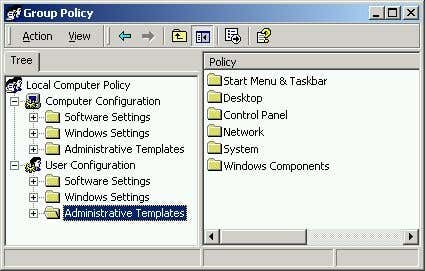
Step 3: Double-Click on “Computer Configuration”.
Step 4: Double-Click on “Administrative Templates”
Step 5: Double-Click on “Network”
Step 6: Double-Click on “QOS Packet Scheduler”
Step 7: Double-Click on “Limit Reservable Bandwidth”
Step 8: Check the box that says ‘Enabled’ and change Bandwidth Limit (%) to 0.
You got 20% increase on your bandwidth speed! Easy, was it not?
Method 2:
The next way is to modify the amount of requests can accept at once. By changing it to a very high number (30+), you should see a massive rise in speed.
So, to this, I’ll put it in a few easy to follow steps.
Step 1: Load up Mozilla Firefox. Now, in the address bar, type “about:config” (Without the ” ” of course). You should see this:
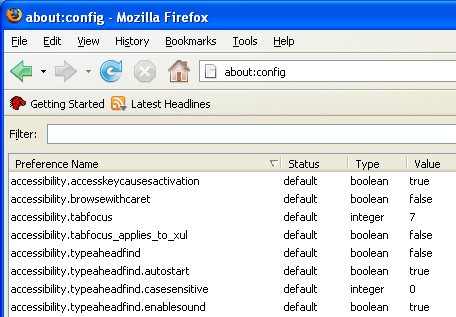
Step 3: Next, scroll down look for the line that says network.http.pipelining, and double-click this. This will set this to “True”.
Step 4: Now, scroll down and look for network.http.pipelining.maxrequests. Once you have done this, double-click it, and a box will pop up. Change the number to 60.
Close Firefox. You will now experience a 10% to 40% increase in speed.
Method 3:
Finally, the last way to increase your speed, is by using an add-on for Firefox, called FasterFox. It’s increased my speed greatly. Although, my friend, who owns a weak computer, said it doesn’t work well for him, so if your computer is weak, you may want to stop here.
FasterFox basically increases your speed by recycling all the idle bandwidth not doing anything, and makes it load your pages faster.

Install it, and your done! Hopefully, you now have a faster running Firefox! Any other ideas, post a comment!
This is a guest post by Anthony Duong, a tech enthusiant.
Sunday, July 29, 2012
Hiren’s BootCD 15.1
Changes From Version 15.0 to 15.1
New Added, Updated Functions:
- ClamWin Free Antivirus 0.97.3 (07-12-2011).
- Added options to integrate updates (on USB/writable drives) for Malwarebytes, SuperAntispyware, Avira Antivirus, Spybot Search & Destroy, ClamWin Antivirus and DrWeb Antivirus.
- Fixed HBCDMenu.cmd for 64bit.
- MiniXP: Fixed MSI installer.
- DrWeb Antivirus is now downloadable only.
Updated Softwares:
Avira AntiVir Personal (07-12-2011),
ComboFix (07-12-2011), Grub4dos 2011-12-06, Malwarebytes Anti-Malware
1.51.1 (07-12-2011), Partition Wizard 7.0, Remove Fake Antivirus 1.82,
RKill (07-12-2011), Spybot - Search & Destroy 1.6.2 (07-12-2011),
SuperAntispyware 5.0.1134 (07-12-2011), TDSSKiller 2.6.21.0, TeamViewer
6.0.10462, Western Digital Lifeguard for Windows 1.24.
Removed Softwares:
- Ammyy Admin
Changes From Version 14.1 to 15.0
New Added Softwares:
- Archive format changed from .uha to .7z
- HBCDMenu.cmd: Can now be launched from WinPE/Network folder, for Vista/7 use F8 before you start windows and then choose Repair Computer > Command prompt and type D:\HBCDMenu
- MiniXP: Added/updated Storage/LAN/WLAN drivers, added Arabic keyboard, Fixed keyboard changer, Set %temp%/pagefile on any drive and other minor improvements.
- FreeOTFE 5.21: Free, open source, on-the-fly transparent disk encryption program (Windows Freeware).
- Junction 1.04: Create/View/Delete Windows junction/reparse points on an NTFS drive (Windows Freeware).
- NTFSLinksView 1.05: To view list of all symbolic links, junctions and their target paths (Windows Freeware).
- ODIN 0.3.4: Open Disk Imager in a Nutshell is similar to Drive Snapshot which supports backing up windows while you are using it (Windows Freeware).
- PC Decrapifier 2.2.8: Removes unwanted preinstalled/bundled software from Windows XP/Vista/7 that usually comes with HP/Dell/Acer etc machines (Windows Freeware).
- Print Flush 1.3: To clean the print spool it restarts the print spooler and deletes junk print files (Windows Freeware).
- TrID File Identifier 2.10: Alternative of UnChk and FileChk to recover filetype from the file content (Windows Freeware).
Updated Softwares:
3DP Chip 11.10, 7-Zip 9.22, Autoruns
11.0, Avira AntiVir Personal (29-10-2011), BellaVista 1.1.0.66,
BlueScreenView 1.40, CCleaner 3.12.1572, CloneDisk 1.9.6, CloneSpy 2.62,
ComboFix (29-10-2011), Complete Internet Repair 1.2.8.1283, CurrPorts
1.96, Defraggler 2.07.346, Device Doctor 2.0, Don't Sleep 2.42, Dr.Web
CureIt! Antivirus (29-10-2011), DriveImage XML 2.30, GParted Partition
Editor 0.9.1, GPU-Z 0.5.5, grub4dos 2011-10-22, HashMyFiles 1.72, HBCD
Customizer 3.0, HBCD Program Launcher 3.2, Image For Dos 2.66, Image For
Windows 2.66, ImgBurn 2.5.6.0, Malwarebytes Anti-Malware 1.51.1
(29-10-2011), Network Password Recovery 1.32, Opera 11.01, Parted Magic
6.7, PCI 32 Sniffer 1.4 (12-09-2011), PCI and AGP info Tool
(12-09-2011), PhotoRec 6.13b, Process Explorer 15.05, Recuva 1.41.537,
Remove Fake Antivirus 1.80, RKill (29-10-2011), SearchMyFiles 1.80,
ShadowCopy 2.00, SIW 2011.09.16, SmartSniff 1.85, SoftPerfect Network
Scanner 5.2.3, Speccy 1.13.276, Spybot - Search & Destroy 1.6.2
(29-10-2011), SuperAntispyware 5.0.1134 (29-10-2011), System Explorer
3.5.2, TeamViewer 6.0.11117, TestDisk 6.13b, TrueCrypt 7.1,
UnknownDevices 1.4.20 (12-09-2011), USBDeview 1.95, WebBrowserPassView
1.15, WinSCP 4.3.5, WirelessKeyView 1.36, WirelessNetView 1.38
Troubleshoot
If you are getting a virus warning from the downloaded files, please check FAQ page "Why am I getting a virus warning for a file downloaded from your website" section.If you are getting redirected to the download page or homepage while you are trying to download the file, please disable the softwares or settings can be blocking referer headers of your browser, connect directly if you are using a proxy, close your browser, clean browser cache and try again.
Please check FAQ page for any other frequently asked questions.
Filename: Hirens.BootCD.15.1.zip
Filesize: 498.36 MB (522565534 bytes)
ISO MD5: B5DE7A10DD1586D47535372EA1AD9BED
ZIP MD5: 5B8E9240AE8CF74939B60AD872CBBABA
Filesize: 498.36 MB (522565534 bytes)
ISO MD5: B5DE7A10DD1586D47535372EA1AD9BED
ZIP MD5: 5B8E9240AE8CF74939B60AD872CBBABA
Monday, July 23, 2012
Liunx ၏ ေကာင္းက်ိဳးမ်ား ....
(၁)
Linux ကအခမဲ့ရရိွတာျဖစ္ပါတယ္။
(၂)
Kernel အပါအ၀င္ အားလုံးေသာ System Program ေတြရဲ႕ Source Code ကိုဖတ္ခြင့္ရျခင္းႏွင့္
ျပဳျပင္ခြင့္ရျခင္း တို႔ေၾကာင့္ သင့္အေနနဲ႔ အစိတ္အပိုင္းအားလုံးကို စိတ္ႀကိဳက္
Customize လုပ္ႏိုင္ပါတယ္။
(၃)
Linux က Hardware Requirement အမ်ားဘူးဗ်။ တင္စားၿပီးေျပာရမယ္ဆိုရင္ Memory 4 MB ႏွင့္
386 ကြန္ပ်ဴတာေလာက္နဲ႔တင္ server ထိုင္မယ္ဆိုရင္လည္း ထိုင္လို႔ရတယ္။
(၄)
Linux ရဲ႕ အဓိကဦးတည္ခ်က္ကို Effecient ျဖစ္ဖို႔ျဖစ္တာေၾကာင့္ Linux ဟာ ျမန္ဆန္တယ္။
တည္ၿငိမ္တယ္။ ေျပာရရင္ေတာ့ Powerful ျဖစ္တယ္ေပါ့ဗ်ာ။ ေနာက္ၿပီးေတာ့ Failure ျဖစ္ခဲတယ္။
ေနာက္ၿပီးသူ႔ကို Maintanance လုပ္ေနရတာမ်ိဳး သိပ္မရိွဘူး။
(၅)
Linux Kernel ကတကယ့္ကို က်စ္က်စ္လစ္လစ္ သိပ္သိပ္သည္းသည္းဗ်။ Root Files System ႏွင့္
Kernel ကို Image ရိုက္လိုက္မယ္ဆိုရင္ 1.44 MB Floppy Disk တစ္ခ်ပ္စာေလာက္သာ ရိွလိမ့္မယ္။
(၆)
Linux က အျခားေသာ Operating System ေတြႏွင့္လည္း Compatible ျဖစ္တယ္ဗ်။ ဥပမာ ကၽြန္ေတာ္တို႔
သိထားၿပီးသားျဖစ္တဲ့ MS-DOS တို႔၊ Windows တို႔ သူတို႔ရဲ႕ File System ေတြအျပင္ အျခားေသာ
Mac OS တို႔၊ OS/2 တို႔၊ Solaris တို႔ႏွင့္လည္း အဆင္ေျပပါတယ္။ ထို႔အျပင္ ၄င္း
system ေတြမွာ အသုံးျပဳတဲ့ Application ေတြႏွင့္လည္း အဆင္ေျပပါတယ္။ network ႏွင့္ပတ္သက္ကရင္လည္း
Ethernet တို႔၊ Token Ring တို႔၊ FDDI တို႔ႏွင့္လည္း အဆင္ေျပပါတယ္။
(၇)
ေနာက္တစ္ခုက Linux က Supporting လည္းေကာင္းတယ္ဗ်။ ဒါကေတာ့ ယုံရခက္ခက္ပဲ ဆိုေပမဲ့ တကယ္တမ္းမွာ
Linux အတြက္ Patch ေတြ Update ေတြက ပုံမွန္မူပိုင္ခြင့္နဲ႔ အလုပ္လုပ္ေနတဲ့
Operating System ေတြထက္ေတာင္ မ်ားေနပါတယ္။
အခ်ဳပ္ဆိုရေသာ္
- Linux ကိုသုံးရင္ ေငြကုန္ေၾကးက်သက္သာမယ္။ သုံးရတဲ့ Operating System ကလည္း တည္ၿငိမ္မႈရိွတယ္။
Performance ကလည္း ေကာင္းျပန္တယ္။ network ပုံစံမ်ိဳးစုံသုံးမယ္ဆိုလည္း ရတယ္။ စိတ္ႀကိဳက္
Customize လည္း လုပ္ႏိုင္တယ္။ အျခားေသာ Common ျဖစ္တဲ့ File Format ေတြနဲ႔လည္း
Compatible ျဖစ္ပါတယ္။ Linux မူကြဲမ်ားစြာရိွတဲ့အတြက္ေၾကာင့္ သင့္အေနနဲ႔ ကိုယ္သုံးခ်င္တဲ့
Linux ကိုေရႊးခ်ယ္ အသုံးျပဳႏုိင္မွာပါ။ ဒါကလည္း ေကာင္းတဲ့ အခ်က္ေပါ့။ Linux တိုင္းဟာလည္း
Installation လုပ္ရတာလြယ္ကူမႈ ရိွပါတယ္။ ေနာက္ျမန္လည္း ျမန္တယ္။ Linux က သင့္ရဲ႕
Hard Disk ျပည့္လုနီးပါးျဖစ္ေနတဲ့ အခ်ိန္ထိတိုင္ ေကာင္းစြာအလုပ္လုပ္ႏိုင္ေနေသးတယ္။
Linux က တစ္္ခ်ိန္တည္းမွာပဲ အလုပ္အမ်ားႀကီးကို လုပ္ႏိုင္ပါတယ္။ Multitasking ေပါ့။
ဥပမာ Background job ေတြေပါ့။ ေနာက္ကြယ္ကေန အလုပ္လုပ္တာမ်ိဳး။ သင္က Print အမ်ားႀကီးထုတ္မယ္။
ၿပီးေတာ့ အလုပ္ကို ဆက္လုပ္ေနမယ္။ Print ကသူ႔ဘာသာသူ ထြက္ေနမယ္။ အဲ့ဒီလို ထုတ္ေနလို႔
သင္လုပ္ေနတဲ့ အလုပ္မွာ ေႏွးက်သြားတာမ်ိဳးမရိွဘူး။ ေနာက္ၿပီး Security အရေျပာမယ္ဆိုရင္လည္း
Linux ကသိပ္ကို Security ေကာင္းတဲ့ Operating System တစ္ခုတည္းမွာ ပါတယ္ဗ်။ မၾကည့္ေစခ်င္တဲ့
သူေတြ ၊ Viruses ေတြရဲ႕ ရန္ကေနမွ ကိုယ့္ရဲ႕ File System ကိုကာကြယ္ေပးပါတယ္။ ေနာက္ဆုံးတစ္ခု
ေျပာခ်င္တာကေတာ့ အကယ္၍သာ သင္ဟာ Software Development လည္းလုပ္တက္မယ္ သို႔တည္းမဟုတ္
Operating System ႏွင့္လည္း ပတ္သက္ၿပီး ျပဳျပင္ေျပာင္းလဲမႈ လုပ္တဲ့ေနရာမွာ လုပ္တက္ကိုင္တက္မယ္ဆိုရင္
Linux ဟာသင့္အတြက္ လက္ညိွးညႊန္ရာ ေရျဖစ္ေစမွာ ျဖစ္ပါတယ္။
Ref: ဆရာဦးေဇာ္လင္း ၏ 3 In 1 Linux စာအုပ္မွ ထုတ္ႏုတ္ေဖၚျပျခင္း ျဖစ္ပါသည္။
အားလုံးပဲ အဆင္ေျပၾကပါေစ .. ေလးစားစြာျဖင့္ ... သူရ
http://www.tramyanmar.net/2012/07/liunx.html#comment-post-message
antamedia hotspot 1.4.6 ေဒါင္းရန္
၀ိုင္ဖိုင္ ေဟာ႕စေပါ႕ ကို ထိန္းတဲ႔ ေဆာ႕၀ဲေလးပါ။ နာရီနဲ႔ ေရာင္းလို႕ရသလို လေပးလဲ ေရာင္းလို႕ရပါတယ္။ ခရက္ ပါ ပါျပီးသားပါဗ်ာ။
http://www.4shared.com/zip/ntbM8EjN/antamedia-hotspot-146-full_2_.html
http://www.4shared.com/zip/ntbM8EjN/antamedia-hotspot-146-full_2_.html
Friday, July 20, 2012
ဘယ္ ပရိုဂရမ္ ကို ဖြင္႕ ဖြင္႕ မဆိုင္တဲ႔ ပရိုဂရမ္ တစ္ခု ထဲ ပြင္႔ ေနေသာ Window 7 ျပႆနာ ကို ေျဖရွင္းျခင္း
window 7 တင္ထားေသာ Laptopတစ္လံုးတြင္ မည္သည္႔ EXE ဖိုင္ ကို ဖြင္႕ ဖြင္႕ window media center ႏွင္႕သာ ပြင္႔ ေနသည္။ ထို ျပႆနာ ကို ေအာက္ပါအတိုင္း ေျဖရွင္းနိဳင္ပါသည္။
1. လိုအပ္ေသာ ဖိုင္ ကို ဒီမွာ ေဒါင္းပါ။
2. ေဒါင္းထားေသာဖိုင္ထဲမွ Default_EXE.reg ကို desktop ေပၚတြင္ တင္ပါ။
3. Default_EXE.reg ကို Right click ႏွိပ္ကာ Merge လုပ္ပါ။
4. ထိုေနာက္ Run, ကို ကလစ္ပါ။Yes (UAC), Yes, and OK ကလစ္ပါ။
5. ထိုေနာက္ ေဒါင္းလုတ္ လုပ္ထားေသာ ဖိုင္မ်ား ကို ဖ်က္လို က ဖ်က္နိဳင္ပါသည္။
6. စက္ ကို restart ခ် လုိက္ပါ။ သင္႕ ကြန္ပ်ဴတာ ပံုမွန္ အတိုင္း ျပန္အလုပ္လုပ္ပါျပီ။
1. Click on the link for the file extension below that you would like to restore the default associations of, and to download it's .reg file.
2. Save the .reg file to your desktop.
3. Right click on the downloaded .reg file and click on Merge.
NOTE: If you wish to see what changes will be made by the REG file, then you can right click on the extracted REG file and click on Edit to see the default registry entries that will be added. REG files are just text files. The "Edit" function just opens them in Notepad.
6. Log off and log on, or restart the computer to apply.
Default Windows 7 File Extension Types:
 Note
To
download all available file extension fixes below in one ZIP folder,
click on the Download button below and save the ZIP file to your
desktop. Open the ZIP file, and extract (drag and drop) the REG file for
the file extension you want to restore to your desktop. Now you could
just pick up at step 3 above.

3GP - Audio and video container format developed by the 3rd Generation Partnership Project (3GPP); designed as a multimedia format for transmitting audio and video files between 3G cell phones and over the Internet; commonly used by mobile phones that support video capture. The default program is Windows Media Player.
3GPP - Audio and video container format developed by the 3rd Generation Partnership Project (3GPP); designed as a multimedia format for transmitting audio and video files between 3G cell phones and over the Internet; commonly used by mobile phones that support video capture. The default program is Windows Media Player.
ani - Windows animated cursor file.
aspx - A file with the ASPX file extension is an ASP.NET Source file.
asf - Advanced Streaming Format (ASF) is an open file format specification for streaming multimedia files containing text, graphics, sound, video, and animation. The default program is Windows Media Player.
asx - Advanced Stream Redirector (.asx) play list files, also known as Windows Media Metafiles, are text files that provide information about a file stream and its presentation. The default program is Windows Media Player.
AudioCD - Audio CD protocol associations.
avi - Audio Video Interleave files. The default program is Windows Media Player.
bas - BASIC source code file.
bak - Usually used to rename a file extension with to make it a backup copy. bak as no associations by default, so this will remove all associations for the bak file extension.
bat - Batch files.
bin - Binary file. By default in Windows 7, .bin files are not associated to be opened by a default program.
bmp - Bitmap image files. The default program is Windows Photo Viewer.
Briefcase - New Briefcase file.
cab - Cabinet files.
chm - Microsoft compiled HTML help files.
cmd - Windows command script files.
com - MS-DOS application files.
Contact - Contact file. Default program is Windows Contacts.
cpp - Program source code written in the C++ programming language; may be a standalone program or one of many files referenced within a programming project; can be viewed with a text editor, but most software development programs will display the text with helpful syntax highlighting
css - Cascading Style Sheet Document file. The default program is Notepad.
cur - Windows File Cursor animation files used for the Microsoft Windows mouse pointer image.
dat - Generic data file created by a specific application; typically accessed only by the application that created the file; may contain data in text or binary format; text-based DAT files can be viewed in a text editor.
db - Data base file.
dic - The .DIC file extension is a Dictionary file (text file) which can be used as an alternate dictionary on top of the Microsoft Windows Dictionary and may contain an optional set of personalized words which the user has opted to add for spell- checking purposes.
Directory - Directory protocol associations
dll - A Dynamic Link Library (dll) file is a support file used by one or more programs.
drive - Drive protocol associations.
dvr-ms - Microsoft Recorded TV Show file. The default program is Windows Media Center.
exe - Executable application files.
folder - Folder protocol associations.
gif - GIF (Graphics Interchange Format) image files. The default program is Internet Explorer.
gz - Usually associated with Gzip. By default, there is no associated program for this in Windows 7.
h - C or C++ program language header file normally with .C or .CPP file. In computer programming, particularly in the C and C++ programming languages, a header file or include file is a file, usually in the form of source code, that is automatically included in another source file by the compiler. Typically, header files are included via compiler directives at the beginning (or head) of the other source file.
hlp - Help file
hta - HTML (Hypertext Mark-up Language) application. The default program is Microsoft (R) HTML Application host (mshta.exe)
htm - HTML (Hypertext Mark-up Language) document files. The default program is Internet Explorer.
html - HTML (Hypertext Mark-up Language) document files. The default program is Internet Explorer.
ico - Icon files. The default program is Windows Photo Viewer.
img - CD or DVD image file, essentially equivalent to an ISO file.
inf - Setup information files. The default program is Notepad.
ini - The INI file type is primarily associated with 'Initialization/Configuration File'. These files are typically ASCII text with various configuration options set into sections.
iso - Image file.
jnt - Journal document file. Default program is Windows Journal.
jpe - JPEG (Joint Photographic Experts Group) image files. The default program is Windows Photo Viewer.
jpeg - JPEG (Joint Photographic Experts Group) image files. The default program is Windows Photo Viewer.
jpg - JPG (Joint Photographic Group) image files. The default program is Windows Photo Viewer.
js - Java Script files. The default program is Microsoft Windows Based Script Host (C:\Windows\System32\wscript.exe).
library-ms - Library folder.
NOTE: To restore the default icons, you may need to do these as well.
lnk - Shortcut link (LNK) files.
log - LOG is a file extension associated with Log files. It is a text file.
M2T- High-definition video recording format used by many HD camcorders; commonly referred to as "HDV;" uses MPEG-2 compression to store HD video data on DV or MiniDV tapes; supports resolutions of 720p and 1080i.
M2TS - Blu-ray BDAV Video File. Video file saved in the high-definition Blu-ray BDAV format; used for saving video data on Blu-ray discs; based on the MPEG-2 transport stream and supports 720p and 1080i formats. BDAV stands for "Blu-ray Disc Audio/Visual," while the M2TS extension refers to "MPEG-2 Transport Stream."
m3u - The M3U file type is primarily associated with 'MP3 Playlist File'. Generally known as a "Winamp" Playlist file, this format has been adopted by a wide variety of MP3 players. The default program is Windows Media Player.
M4V - MPEG-4 file extension used for videos downloaded from the Apple iTunes store; includes TV episodes, full-length movies, and music videos; similar to an .MP4 file, but may be copy-protected using Apple's FairPlay DRM copyright protection.
mkv - A Matroska Multimedia Container file is a video format similar to the .AVI, .ASF, and .MOV formats. By default Windows 7 does not have support for opening this file type and has no association. DivXPlayer is a good free program to install that does support playing this file extension. This download will set this file extension back to the default unassociated state in Windows 7.
mov - Movie file. The default program is Windows Media Player.
mp3 - MP3 sound format file. The default program is Windows Media Player.
mp4 - MPEG-4 movie file. The default program is Windows Media Player.
mpa - MPEG audio file. The default program is Windows Media Player.
mpe - MPEG movie file. The default program is Windows Media Player.
mpeg - MPEG (Moving Picture Experts Group) video file. The default program is Windows Media Player.
mpg - MPEG video file. The default program is Windows Media Player.
msc - Mirosoft Common Console document files.
msi - Microsoft Windows Installer installation package file.
msp - Microsoft Windows Installer Patch file.
MTS - MadTracker 2 Sample File. High-definition MPEG Transport Stream video format, commonly called "AVCHD" (Advanced Video Codec High Definition); used by Sony, Panasonic, and other HD camcorders; based on the MPEG-2 transport stream and supports 720p and 1080i HD video formats. MTS files can typically be opened and edited using the software included with Sony and Panasonic HD camcorders. The default program in Windows 7 is Windows Media Player.
otf - Open Type Font file. The default program is Windows Font Viewer.
Package - Package protocol.
pbk - Dial-Up Phonebook file. The default program is Remote Access Phonebook.
pdf - Portable Document Format (PDF) is a file format created by Adobe Systems. By default, Windows 7 does not support reading this file type. Using this to restore the default PDF association in Windows 7 will remove all associations for the pdf file extension. You will need to install a 3rd party program like Adobe Reader or Foxit Reader to be able to open and read pdf files in Windows 7.
png - Portable Network Graphics (PNG) is a bitmap compression method for image files. PNG supports 16.7 million colors, it is lossless and also supports index color, grayscale, true color, transparency, and is streamable. It is thus the best compression method (better than GIF or JPEG) for use on the web.
ps1 - Microsoft Windows PowerShell command line shell and scripting language file. The default program used to open with is Notepad.
psd - The PSD file format, created by Adobe, contains graphics/photos created by image editing software such as Adobe Photoshop.
reg - Registry file.
NOTE: You may need to set the default program as Registry Editor (C:\Windows\regedit.exe) for reg file extensions, or enable regedit before you will be able to use this REG file.
rtf - Rich Text document files. The default program is WordPad.
scr - Screen Saver files.
tar - Tape Archive file. By default, there is no associated program for this in Windows 7.
themepack - A .themepack file is a Windows Theme Pack file.
tif - Tagged Image files Format. The default program is Windows Photo Viewer.
tiff - Tagged Image files Format. The default program is Windows Photo Viewer.
tmp - Temp file. By default, this file extension does not have a program associated with it.
TS - Video Transport Stream file used for storing video on a DVD; compresses video data using standard MEPG-2 (.MPEG) video compression. TS files are often saved as multiple files on a DVD, i.e. "moviename1.ts," "moviename2.ts," "moviename3.ts," etc. They can be played back by various software DVD players and video editing tools
ttf - True Type font file. The default program is Windows Font Viewer.
TTS - A .tts file is a text file (an ini file) that corresponds to your book. The ToolBook Translation System (TTS) creates the .tts file for you when you set the book's TTS Identifier through the Setup Sources window.
txt - Text document files. The default program is Notepad.
url - Internet website shortcut link. The default program is Internet Explorer.
vbs - Visual Basic Script files. The default program is Microsoft Windows Based Script Host (C:\Windows\System32\wscript.exe).
vob - Movie data file from a DVD disc, typically stored in the VIDEO_TS folder; contains the majority of data stored on the disc including video, audio, and subtitles; usually formatted as an MPEG-2 system stream and can be opened by various video playback programs.
wav - Wave audio file. The default program is Windows Media Player.
wma - Windows Media Audio files. The default program is Windows Media Player.
wmv - Windows Media Audio/Video file. The default program is Windows Media Player.
wsf - Windows Script Files. The default program is Microsoft Windows Based Script Host (C:\Windows\System32\wscript.exe).
xml - Excel Macro files. The default program is Internet Explorer.
xps - XML Paper Specification document files. The default program is XPS Viewer (C:\Windows\System32\XPSViewer\XPSViewer.exe).
xsl - A eXtensible Stylesheet Language file that defines the style of text, tables, and other objects within a XML document; similar to a .CSS file used by .HTML documents. The default program is Internet Explorer.
zip - ZIP file extensions is a archival and data compression format used to compress one or more files to reduce the size of the file. The default program is Compressed Folders.
1. လိုအပ္ေသာ ဖိုင္ ကို ဒီမွာ ေဒါင္းပါ။
2. ေဒါင္းထားေသာဖိုင္ထဲမွ Default_EXE.reg ကို desktop ေပၚတြင္ တင္ပါ။
3. Default_EXE.reg ကို Right click ႏွိပ္ကာ Merge လုပ္ပါ။
4. ထိုေနာက္ Run, ကို ကလစ္ပါ။Yes (UAC), Yes, and OK ကလစ္ပါ။
5. ထိုေနာက္ ေဒါင္းလုတ္ လုပ္ထားေသာ ဖိုင္မ်ား ကို ဖ်က္လို က ဖ်က္နိဳင္ပါသည္။
6. စက္ ကို restart ခ် လုိက္ပါ။ သင္႕ ကြန္ပ်ဴတာ ပံုမွန္ အတိုင္း ျပန္အလုပ္လုပ္ပါျပီ။
1. Click on the link for the file extension below that you would like to restore the default associations of, and to download it's .reg file.
2. Save the .reg file to your desktop.
3. Right click on the downloaded .reg file and click on Merge.
NOTE: If you wish to see what changes will be made by the REG file, then you can right click on the extracted REG file and click on Edit to see the default registry entries that will be added. REG files are just text files. The "Edit" function just opens them in Notepad.
5. When done, you can delete the downloaded .zip and .reg files on the desktop if you like.4. If prompted, click on Run, Yes (UAC), Yes, and OK.Tip
If you do not see a Merge option when you right click on the REG file, then you will need to check in Default Programs to set the reg file extension to have it's Current Default program set as Registry Editor (C:\Windows\regedit.exe). Afterwards, try merging the REG file again.
NOTE: If you are logged in a standard user account, then you will get a Cannot import type error. Just click on OK for it. This is normal since what cannot be imported can only be done so by an administrator account instead. It will still restore the default association of the file extension though.
6. Log off and log on, or restart the computer to apply.
Default Windows 7 File Extension Types:
Note3GP - Audio and video container format developed by the 3rd Generation Partnership Project (3GPP); designed as a multimedia format for transmitting audio and video files between 3G cell phones and over the Internet; commonly used by mobile phones that support video capture. The default program is Windows Media Player.
3GPP - Audio and video container format developed by the 3rd Generation Partnership Project (3GPP); designed as a multimedia format for transmitting audio and video files between 3G cell phones and over the Internet; commonly used by mobile phones that support video capture. The default program is Windows Media Player.
ani - Windows animated cursor file.
aspx - A file with the ASPX file extension is an ASP.NET Source file.
asf - Advanced Streaming Format (ASF) is an open file format specification for streaming multimedia files containing text, graphics, sound, video, and animation. The default program is Windows Media Player.
asx - Advanced Stream Redirector (.asx) play list files, also known as Windows Media Metafiles, are text files that provide information about a file stream and its presentation. The default program is Windows Media Player.
AudioCD - Audio CD protocol associations.
avi - Audio Video Interleave files. The default program is Windows Media Player.
bas - BASIC source code file.
bak - Usually used to rename a file extension with to make it a backup copy. bak as no associations by default, so this will remove all associations for the bak file extension.
bat - Batch files.
bin - Binary file. By default in Windows 7, .bin files are not associated to be opened by a default program.
bmp - Bitmap image files. The default program is Windows Photo Viewer.
Briefcase - New Briefcase file.
cab - Cabinet files.
chm - Microsoft compiled HTML help files.
cmd - Windows command script files.
com - MS-DOS application files.
Contact - Contact file. Default program is Windows Contacts.
cpp - Program source code written in the C++ programming language; may be a standalone program or one of many files referenced within a programming project; can be viewed with a text editor, but most software development programs will display the text with helpful syntax highlighting
css - Cascading Style Sheet Document file. The default program is Notepad.
cur - Windows File Cursor animation files used for the Microsoft Windows mouse pointer image.
dat - Generic data file created by a specific application; typically accessed only by the application that created the file; may contain data in text or binary format; text-based DAT files can be viewed in a text editor.
db - Data base file.
dic - The .DIC file extension is a Dictionary file (text file) which can be used as an alternate dictionary on top of the Microsoft Windows Dictionary and may contain an optional set of personalized words which the user has opted to add for spell- checking purposes.
Directory - Directory protocol associations
dll - A Dynamic Link Library (dll) file is a support file used by one or more programs.
drive - Drive protocol associations.
dvr-ms - Microsoft Recorded TV Show file. The default program is Windows Media Center.
exe - Executable application files.
folder - Folder protocol associations.
gif - GIF (Graphics Interchange Format) image files. The default program is Internet Explorer.
gz - Usually associated with Gzip. By default, there is no associated program for this in Windows 7.
h - C or C++ program language header file normally with .C or .CPP file. In computer programming, particularly in the C and C++ programming languages, a header file or include file is a file, usually in the form of source code, that is automatically included in another source file by the compiler. Typically, header files are included via compiler directives at the beginning (or head) of the other source file.
hlp - Help file
hta - HTML (Hypertext Mark-up Language) application. The default program is Microsoft (R) HTML Application host (mshta.exe)
htm - HTML (Hypertext Mark-up Language) document files. The default program is Internet Explorer.
html - HTML (Hypertext Mark-up Language) document files. The default program is Internet Explorer.
ico - Icon files. The default program is Windows Photo Viewer.
img - CD or DVD image file, essentially equivalent to an ISO file.
inf - Setup information files. The default program is Notepad.
ini - The INI file type is primarily associated with 'Initialization/Configuration File'. These files are typically ASCII text with various configuration options set into sections.
iso - Image file.
jnt - Journal document file. Default program is Windows Journal.
jpe - JPEG (Joint Photographic Experts Group) image files. The default program is Windows Photo Viewer.
jpeg - JPEG (Joint Photographic Experts Group) image files. The default program is Windows Photo Viewer.
jpg - JPG (Joint Photographic Group) image files. The default program is Windows Photo Viewer.
js - Java Script files. The default program is Microsoft Windows Based Script Host (C:\Windows\System32\wscript.exe).
library-ms - Library folder.
NOTE: To restore the default icons, you may need to do these as well.
lnk - Shortcut link (LNK) files.
log - LOG is a file extension associated with Log files. It is a text file.
M2T- High-definition video recording format used by many HD camcorders; commonly referred to as "HDV;" uses MPEG-2 compression to store HD video data on DV or MiniDV tapes; supports resolutions of 720p and 1080i.
M2TS - Blu-ray BDAV Video File. Video file saved in the high-definition Blu-ray BDAV format; used for saving video data on Blu-ray discs; based on the MPEG-2 transport stream and supports 720p and 1080i formats. BDAV stands for "Blu-ray Disc Audio/Visual," while the M2TS extension refers to "MPEG-2 Transport Stream."
m3u - The M3U file type is primarily associated with 'MP3 Playlist File'. Generally known as a "Winamp" Playlist file, this format has been adopted by a wide variety of MP3 players. The default program is Windows Media Player.
M4V - MPEG-4 file extension used for videos downloaded from the Apple iTunes store; includes TV episodes, full-length movies, and music videos; similar to an .MP4 file, but may be copy-protected using Apple's FairPlay DRM copyright protection.
mkv - A Matroska Multimedia Container file is a video format similar to the .AVI, .ASF, and .MOV formats. By default Windows 7 does not have support for opening this file type and has no association. DivXPlayer is a good free program to install that does support playing this file extension. This download will set this file extension back to the default unassociated state in Windows 7.
mov - Movie file. The default program is Windows Media Player.
mp3 - MP3 sound format file. The default program is Windows Media Player.
mp4 - MPEG-4 movie file. The default program is Windows Media Player.
mpa - MPEG audio file. The default program is Windows Media Player.
mpe - MPEG movie file. The default program is Windows Media Player.
mpeg - MPEG (Moving Picture Experts Group) video file. The default program is Windows Media Player.
mpg - MPEG video file. The default program is Windows Media Player.
msc - Mirosoft Common Console document files.
msi - Microsoft Windows Installer installation package file.
msp - Microsoft Windows Installer Patch file.
MTS - MadTracker 2 Sample File. High-definition MPEG Transport Stream video format, commonly called "AVCHD" (Advanced Video Codec High Definition); used by Sony, Panasonic, and other HD camcorders; based on the MPEG-2 transport stream and supports 720p and 1080i HD video formats. MTS files can typically be opened and edited using the software included with Sony and Panasonic HD camcorders. The default program in Windows 7 is Windows Media Player.
otf - Open Type Font file. The default program is Windows Font Viewer.
Package - Package protocol.
pbk - Dial-Up Phonebook file. The default program is Remote Access Phonebook.
pdf - Portable Document Format (PDF) is a file format created by Adobe Systems. By default, Windows 7 does not support reading this file type. Using this to restore the default PDF association in Windows 7 will remove all associations for the pdf file extension. You will need to install a 3rd party program like Adobe Reader or Foxit Reader to be able to open and read pdf files in Windows 7.
png - Portable Network Graphics (PNG) is a bitmap compression method for image files. PNG supports 16.7 million colors, it is lossless and also supports index color, grayscale, true color, transparency, and is streamable. It is thus the best compression method (better than GIF or JPEG) for use on the web.
ps1 - Microsoft Windows PowerShell command line shell and scripting language file. The default program used to open with is Notepad.
psd - The PSD file format, created by Adobe, contains graphics/photos created by image editing software such as Adobe Photoshop.
reg - Registry file.
NOTE: You may need to set the default program as Registry Editor (C:\Windows\regedit.exe) for reg file extensions, or enable regedit before you will be able to use this REG file.
rtf - Rich Text document files. The default program is WordPad.
scr - Screen Saver files.
tar - Tape Archive file. By default, there is no associated program for this in Windows 7.
themepack - A .themepack file is a Windows Theme Pack file.
tif - Tagged Image files Format. The default program is Windows Photo Viewer.
tiff - Tagged Image files Format. The default program is Windows Photo Viewer.
tmp - Temp file. By default, this file extension does not have a program associated with it.
TS - Video Transport Stream file used for storing video on a DVD; compresses video data using standard MEPG-2 (.MPEG) video compression. TS files are often saved as multiple files on a DVD, i.e. "moviename1.ts," "moviename2.ts," "moviename3.ts," etc. They can be played back by various software DVD players and video editing tools
ttf - True Type font file. The default program is Windows Font Viewer.
TTS - A .tts file is a text file (an ini file) that corresponds to your book. The ToolBook Translation System (TTS) creates the .tts file for you when you set the book's TTS Identifier through the Setup Sources window.
txt - Text document files. The default program is Notepad.
url - Internet website shortcut link. The default program is Internet Explorer.
vbs - Visual Basic Script files. The default program is Microsoft Windows Based Script Host (C:\Windows\System32\wscript.exe).
vob - Movie data file from a DVD disc, typically stored in the VIDEO_TS folder; contains the majority of data stored on the disc including video, audio, and subtitles; usually formatted as an MPEG-2 system stream and can be opened by various video playback programs.
wav - Wave audio file. The default program is Windows Media Player.
wma - Windows Media Audio files. The default program is Windows Media Player.
wmv - Windows Media Audio/Video file. The default program is Windows Media Player.
wsf - Windows Script Files. The default program is Microsoft Windows Based Script Host (C:\Windows\System32\wscript.exe).
xml - Excel Macro files. The default program is Internet Explorer.
xps - XML Paper Specification document files. The default program is XPS Viewer (C:\Windows\System32\XPSViewer\XPSViewer.exe).
xsl - A eXtensible Stylesheet Language file that defines the style of text, tables, and other objects within a XML document; similar to a .CSS file used by .HTML documents. The default program is Internet Explorer.
zip - ZIP file extensions is a archival and data compression format used to compress one or more files to reduce the size of the file. The default program is Compressed Folders.
Subscribe to:
Posts (Atom)